

Published: |Last updated:
Listen to this article
Show Quick ReadConcise summary from this article
A reliable CCTV system depends on more than cameras and recording equipment. The cable connecting each component plays an important role in video transmission, power delivery, and overall system performance. Choosing the right CCTV Cable helps maintain stable connections, reduce signal interference, and support dependable security monitoring at home, in offices, shops, warehouses, and commercial buildings. With different cable options available, selecting the correct one can be confusing. The right…
Ask AI About This Article
Answers are limited to information in this article.
A reliable CCTV system depends on more than cameras and recording equipment. The cable connecting each component plays an important role in video transmission, power delivery, and overall system performance. Choosing the right CCTV Cable helps maintain stable connections, reduce signal interference, and support dependable security monitoring at home, in offices, shops, warehouses, and commercial buildings.
With different cable options available, selecting the correct one can be confusing. The right choice depends on your camera type, transmission distance, power requirements, installation environment, and recording system. This guide explains the main cable types, their uses, benefits, installation considerations, and how to choose a suitable option for your security setup.
What Is a CCTV Cable?
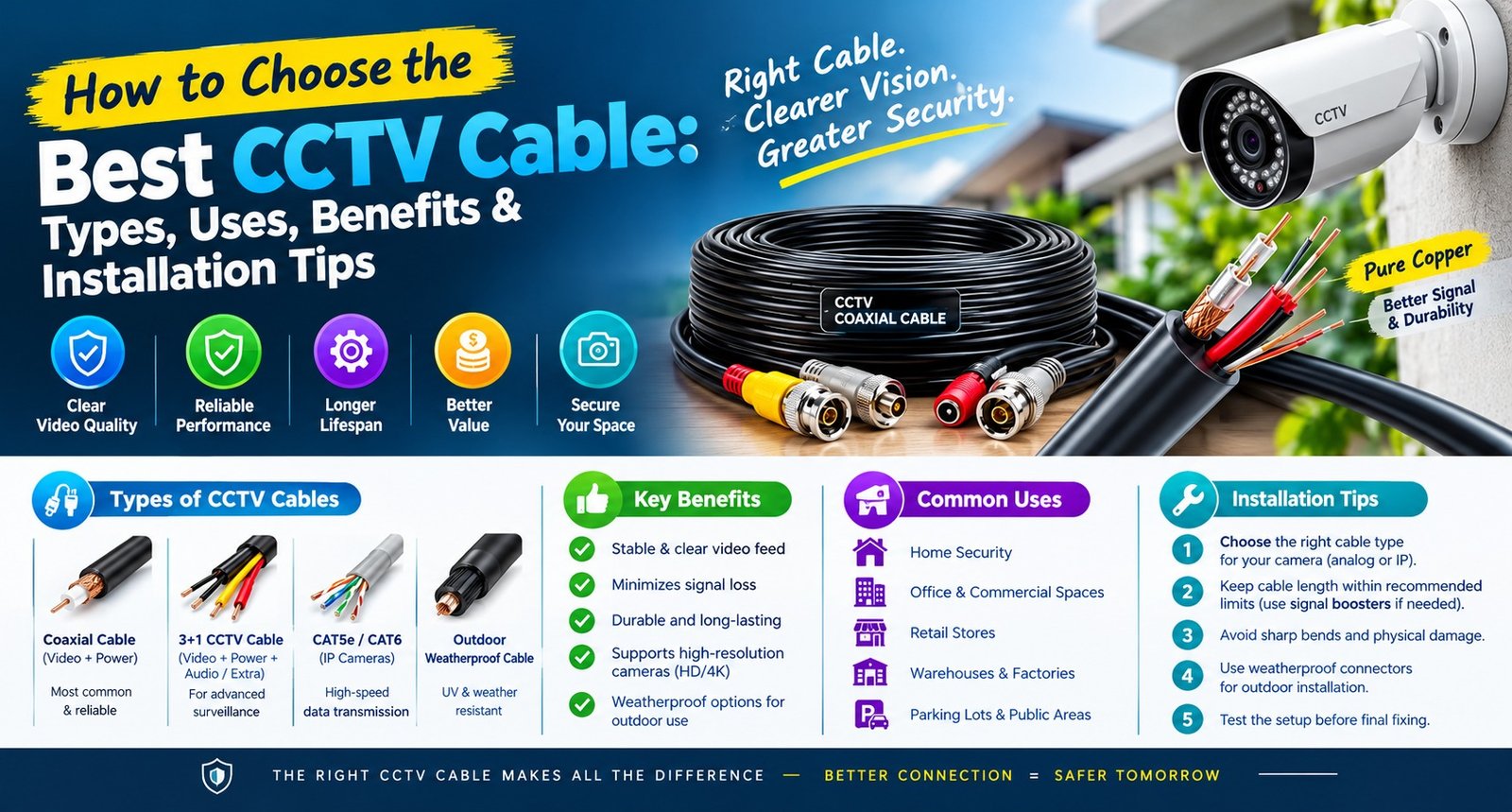
A CCTV cable connects security cameras to recording equipment, monitors, network devices, or power sources, depending on the surveillance system design. It carries video signals, data, electrical power, or a combination of these functions.
Traditional analogue CCTV systems commonly use coaxial cables to transmit video. Modern IP cameras generally use Ethernet cables to communicate with a network recorder or switch. Some installations also require separate power connections, while Power over Ethernet (PoE) systems can transmit both data and power through a compatible Ethernet cable.
Understanding these differences helps you select a cable that matches your equipment rather than choosing one based only on price or appearance.
Different CCTV Cable Types and Their Uses
Understanding CCTV Cable Types is the first step toward building a reliable surveillance system. Each cable design serves different equipment and installation requirements.
1. Coaxial Cable
Coaxial cable is widely used in traditional analogue CCTV installations. It contains a central conductor, insulating material, shielding, and an outer protective layer. This construction helps carry video signals while reducing the effects of external interference.
A Coaxial Cable for CCTV is commonly used with compatible analogue cameras and DVR systems. Depending on the camera technology and equipment specifications, coaxial connections may support standard-definition or certain high-definition analogue video formats.
Coaxial cable is suitable when upgrading or maintaining an existing wired surveillance installation that already uses compatible connectors and recording equipment.
2. RG59 Cable
RG59 CCTV Cable is a common coaxial cable option for analogue video transmission. It is frequently used in security installations where the cable length and signal requirements are appropriate for the equipment.
RG59 may be available in different constructions, including versions designed for video transmission with an additional power conductor. The combined design can simplify wiring when a compatible camera needs separate video and power connections.
Before selecting RG59, check the manufacturer’s recommended transmission distance, conductor quality, shielding, connector compatibility, and whether the camera requires a separate power wire.
3. Ethernet Cable
Ethernet cable is commonly used with IP-based surveillance cameras. These cameras transmit digital video over a network to a compatible network video recorder (NVR), network switch, or other supported recording system.
Cat5e and Cat6 Ethernet cables are common options, but the correct choice depends on the camera’s network speed, cable length, installation conditions, and power requirements.
For compatible PoE cameras, one Ethernet cable can carry both network data and electrical power. This can reduce the number of separate cables needed and simplify installation.
4. CCTV Power Cable
A CCTV Power Cable supplies electrical power to cameras and related equipment when power is not delivered through the main data or video cable. Its required conductor size depends on the camera’s voltage, current consumption, cable length, and acceptable voltage drop.
For longer cable runs, an undersized conductor may cause voltage loss and lead to unstable operation. Always check the equipment’s power rating and follow the manufacturer’s wiring recommendations.
Never assume that every CCTV cable can safely carry power. Confirm its electrical specifications and use an appropriate power supply, conductor size, and protective arrangement.
How to Choose a CCTV Camera Cable
Choosing the right CCTV Camera Cable requires matching the cable to your surveillance equipment and installation environment. Consider the following factors before purchasing.
1. Check Camera Compatibility
First, identify whether your cameras are analogue, HD analogue, or IP-based. Analogue cameras may use coaxial connections, while IP cameras generally use Ethernet connections.
Also check the connectors, recording device, supported video format, network speed, and power method. A cable that works with one camera system may not be suitable for another.
2. Measure the Required Cable Length
Measure the route from each camera to the recorder, switch, or power source. Include the actual path around walls, ceilings, conduits, and other obstacles rather than measuring only the straight-line distance.
Longer runs can introduce signal loss or voltage drop, depending on the cable design and equipment. For Ethernet networks, standard copper Ethernet channels are generally limited to 100 metres, including the patch cords, under applicable standards. Longer installations may require appropriately designed network extensions, fibre links, or additional network equipment.
3. Consider Shielding and Interference
Electrical equipment, motors, fluorescent lighting, and nearby power cables may create interference in some installations. Suitable shielding, proper routing, and quality connectors can help reduce interference-related problems.
Avoid running low-voltage signal cables directly alongside mains wiring unless the installation design and local electrical requirements permit it. Follow applicable separation and safety rules.
4. Evaluate Indoor and Outdoor Conditions
Indoor cables may not be designed to withstand sunlight, rain, moisture, or temperature changes. For outdoor installations, select cable specifically rated for the intended environment.
If the cable will be buried, confirm that it is rated for direct burial or install it in a suitable protective conduit. Outdoor-rated does not automatically mean direct-burial-rated.
5. Review Cable Quality
Check the conductor material, conductor size, insulation, shielding, jacket rating, and manufacturer’s specifications. For Ethernet installations, verify that the cable meets the required category and relevant performance standards.
Be cautious of cables with unclear specifications or misleading speed claims. A properly specified cable helps support the expected performance of the complete surveillance system.
Benefits of Choosing the Right Cable
Selecting a suitable cable can improve the reliability and maintainability of a security installation.
- Stable video transmission: Compatible cables help cameras deliver signals to the intended recording equipment.
- Reliable power delivery: Correct conductor sizing helps control voltage drop in separately powered cameras.
- Reduced interference: Appropriate shielding and cable routing can reduce signal problems in challenging environments.
- Simpler installation: Combined video-and-power cables or PoE Ethernet connections can reduce separate wiring requirements when supported.
- Better long-term maintenance: Clearly labelled, properly installed cables make troubleshooting and future upgrades easier.
- Suitable environmental protection: Correct jacket ratings help protect wiring against the conditions expected at the installation site.
Cable selection alone cannot guarantee perfect footage. Camera quality, connectors, power supplies, recording equipment, network configuration, and installation workmanship also affect performance.
CCTV Cable Installation: Important Tips
Proper CCTV Cable Installation is essential for a dependable surveillance system. Even a high-quality cable can perform poorly if it is damaged, incorrectly terminated, or installed in an unsuitable environment.
Plan the Cable Route
Decide where each camera, recorder, switch, and power supply will be located. Choose a route that avoids unnecessary bends, sharp edges, heat sources, and areas where the cable may be crushed or pulled.
Use suitable clips, cable trays, conduits, or other approved supports to keep the wiring organised.
Use Compatible Connectors
Coaxial systems commonly use compatible BNC connectors, while Ethernet systems generally use RJ45 connectors. The exact connector and termination method must match the equipment and cable design.
Poorly fitted connectors can cause intermittent signals, connection failures, or reduced network performance. Use the appropriate tools and follow the cable manufacturer’s instructions.
Protect Outdoor Connections
Outdoor joints and connectors need protection appropriate to their exposure to rain, moisture, dust, and temperature changes. Use suitable weather-resistant enclosures and cable entry methods.
Avoid leaving exposed connections where water can enter or collect.
Test Before Finalising the Installation
Test each camera connection before closing ceilings, walls, or conduits. Confirm that video reaches the recorder, network devices recognise IP cameras, and power remains within the equipment’s specified limits.
For network installations, verify the link speed and PoE operation where applicable. Label both ends of each cable to make future maintenance easier.
Follow Electrical Safety Requirements
Keep low-voltage surveillance wiring properly separated from mains wiring as required by local regulations. Use suitable power supplies and protective devices, and consult a qualified installer when the work involves mains electricity or complex building wiring.
Common CCTV Cable Mistakes to Avoid
Some installation problems result from choosing an unsuitable cable or overlooking basic wiring requirements.
- Selecting coaxial cable for an Ethernet-only IP camera connection.
- Assuming every Ethernet cable supports the required PoE load and distance.
- Using an undersized power conductor for a long camera run.
- Installing indoor-only cable outdoors.
- Ignoring connector quality and termination requirements.
- Exceeding recommended transmission distances without suitable equipment.
- Running cables near interference sources without considering routing and shielding.
- Failing to test and label connections before completing the installation.
Avoiding these mistakes can reduce troubleshooting time and help the system operate as intended.
Which Is the Best CCTV Cable for Your Surveillance System?
The Best CCTV Cable for Surveillance Systems depends on the camera technology, installation distance, power requirements, and environment. There is no single cable that is ideal for every security system.
For a compatible analogue camera system, coaxial cable such as RG59 may be appropriate. For IP cameras, Cat5e or Cat6 Ethernet cable may be suitable depending on network and power requirements. Where cameras need a separate power supply, an appropriately rated power cable may also be necessary.
Before making a decision, review the camera and recorder specifications, measure the cable route, confirm environmental ratings, and select compatible connectors. For complex or long-distance installations, professional advice can help ensure the design meets the required performance and safety standards.
CCTV Cable for Home Security
A CCTV Cable for Home Security should suit the layout of the property and the type of cameras being installed. Homes may require wiring for entrances, driveways, garages, stairways, gardens, and other important areas.
For IP cameras, Ethernet cabling can provide network connectivity and, with compatible PoE equipment, power through the same cable. For existing analogue systems, the appropriate coaxial cable may allow the installation to continue using compatible cameras and recording equipment.
Choose cables according to indoor or outdoor exposure, expected cable length, and the available installation route. Neat routing, secure mounting, and weather-protected connections help keep the system organised and easier to maintain.
Conclusion
Choosing the right cable is an important step in building a reliable CCTV system. Consider camera compatibility, cable distance, power delivery, shielding, connector quality, and environmental conditions before purchasing. Correct installation and testing are equally important for reducing connection problems and maintaining consistent surveillance.
Whether you are installing a new system or upgrading an existing one, match the cable to the equipment specifications instead of relying on price alone. A well-planned cable setup can make your security system easier to install, troubleshoot, and maintain over time.
Frequently Asked Questions (FAQs)
1. What type of cable is used for CCTV cameras?
Analogue CCTV cameras commonly use coaxial cable, while IP cameras generally use Ethernet cable. The correct option depends on the camera and recording equipment.
2. Is RG59 cable suitable for CCTV?
RG59 is commonly used for compatible analogue CCTV video connections. Check the system specifications and recommended transmission distance before installation.
3. Can Ethernet cable carry CCTV video and power?
Yes. Compatible IP cameras and PoE equipment can transmit network data and electrical power over the same Ethernet cable.
4. What is the difference between coaxial and Ethernet cable?
Coaxial cable is commonly used for analogue video transmission, while Ethernet cable carries network data and can also provide power to compatible PoE devices.
5. Can CCTV cable be installed outdoors?
Yes, if the cable is rated for the intended outdoor conditions. Direct burial requires a cable specifically rated for that purpose or a suitable protective installation method.
6. Does cable length affect CCTV performance?
Yes. Excessive cable length can cause signal loss, network limitations, or voltage drop, depending on the cable type and system design.
7. How do I choose the right cable for IP cameras?
Check the camera’s network speed, PoE requirements, maximum channel length, cable category, and environmental conditions.
8. Do all CCTV cameras need a separate power cable?
No. Compatible PoE IP cameras can receive power through Ethernet. Other camera types may require a separate power connection.
9. Why is my CCTV camera showing a poor or unstable signal?
Possible causes include damaged cables, loose connectors, interference, insufficient power, excessive cable length, or incorrect configuration. Test each part of the connection to identify the cause.
10. Can I reuse existing CCTV wiring?
Sometimes. Reuse is possible when the existing cable is in good condition and compatible with the new cameras, recording equipment, and power requirements.
11. Is a more expensive CCTV cable always better?
Not necessarily. The important factors are verified specifications, compatibility, conductor quality, environmental ratings, and suitability for the installation.
12. What should I check before buying CCTV cable?
Confirm the camera type, cable length, connector type, power requirements, conductor specifications, shielding, and indoor or outdoor rating.
13. Can CCTV cables run alongside electrical wires?
Cable routing must follow applicable electrical safety requirements. Maintain the required separation and use appropriate installation methods to reduce interference and safety risks.
14. How can I make CCTV cable installation easier to maintain?
Label both ends, organise cables neatly, use suitable supports, protect connectors, and keep a record of which cable connects to each camera.
15. Should I install CCTV cables myself or hire a professional?
Simple low-voltage installations may be manageable for someone with the appropriate skills. Complex wiring, long cable runs, outdoor installations, and any work involving mains electricity may require a qualified professional.
Promote your articles nowCheck for details
Choose a promotion package
Choose a package below, scan the QR code and pay the displayed amount for 20 days.
After payment, email your article title and payment screenshot to info@yourneeds.asia. Once confirmation is received, one of our administrators will activate the promotion.

Choose where your promoted article receives extra visibility
Promotion changes presentation and placement for the selected period. It does not guarantee traffic, enquiries, search ranking or sales.
Priority visibility in the VIP Lounge, promoted shelves and highlighted article areas.
Top-style highlighting in article directories, homepage feeds and promoted article blocks.
Premium styling across supported article feeds, recommendations and directory placements.
Featured presentation in supported homepage, category, directory and related-article areas.
Build a stronger online presence for your business
Get Your Website for ₹15,000
Are you listed and don't have a website for your business? We can plan, design and launch a responsive website that makes your business easier to understand and contact.
Get My WebsiteSEO Starts from ₹10,000/Month
Improve how your business is presented across Google, local listings and AI-powered search results with ongoing SEO, content and authority-building work.
Improve My VisibilitySuggested Articles
View all articles
Farmvale Psyllium | Global Psyllium Husk, Powder & Seeds Manufacturer, Supplier and Exporter
Farmvale Psyllium, a division of Veerral Agro Tech and Organic Products India, is a leading Psyllium Husk Manufacturer, Supplier, and Exporter in India, based…

Power Strips Explained: Types, Benefits, Uses, and How to Choose the Right One
Modern homes and offices use multiple electrical devices every day, including laptops, computers, televisions, routers, chargers, printers, and other appliances. When wall outlets are…

What Is a USB Hub? Types, Benefits, Uses, and How to Choose the Right One
Modern computers, laptops, and tablets come with multiple features, but one common limitation is the number of available ports. Many devices have only a…

What Is a Mini Router UPS? Types, Benefits, and How to Choose the Right One
Power cuts can interrupt your internet connection when you are working from home, attending online meetings, studying, or managing connected devices. A mini UPS…
Latest Blog Posts
View all articles
CLU Full Form in Real Estate: Meaning, Uses, and Importance
When buying land, understanding its permitted use is just as important as checking its location and price. A property may appear suitable for a…

Shamsi Farm House Karachi – A Perfect Place for Family Picnics and Private Events
Planning a relaxing day out with family, friends, or colleagues? Shamsi Farm House Karachi is a popular option for people looking for an outdoor…

Best ServiceNow ITSM Training In Pune
Understand IT Service Management Modern IT departments require well-defined processes for managing service disruptions, handling user requests, controlling changes to systems and ensuring high…

Best Service Now ITSM Training in Noida | Techmyindia
Learn Practical IT Service Management With IT Service Management being in high demand, ServiceNow is becoming a key platform for professionals wanting to expand…

How Promotional Gifts in Dubai Help Businesses Build Stronger Customer Relationships
In a competitive business environment, building strong customer relationships is essential for long-term success. Businesses need more than quality products and services to stay…

Choosing the Right Trenching Equipment for Pipeline, OFC, and Solar Infrastructure Projects
The Gaja 100XT Tractor Mounted Trencher is designed for this type of work. It helps contractors create controlled trenches while using a tractor as…