

Published: |Last updated:
Listen to this article
Show Quick ReadConcise summary from this article
Time Machine is a built-in macOS backup feature that automatically saves copies of your files, apps, and system data. While it’s incredibly useful, backups can quickly take up significant storage space. If your backup disk is full or you simply want to remove old backups, deleting Time Machine backups is a practical solution. In this guide, we’ll walk you through simple ways to delete Time Machine backups safely. Why Delete…
Ask AI About This Article
Answers are limited to information in this article.
Time Machine is a built-in macOS backup feature that automatically saves copies of your files, apps, and system data. While it’s incredibly useful, backups can quickly take up significant storage space. If your backup disk is full or you simply want to remove old backups, deleting Time Machine backups is a practical solution.
In this guide, we’ll walk you through simple ways to delete Time Machine backups safely.
Why Delete Time Machine Backups?
You might want to delete backups for several reasons:
- Free up storage space on your backup drive
- Remove outdated or unnecessary backups
- Fix issues with corrupted backups
- Start fresh with a new backup cycle
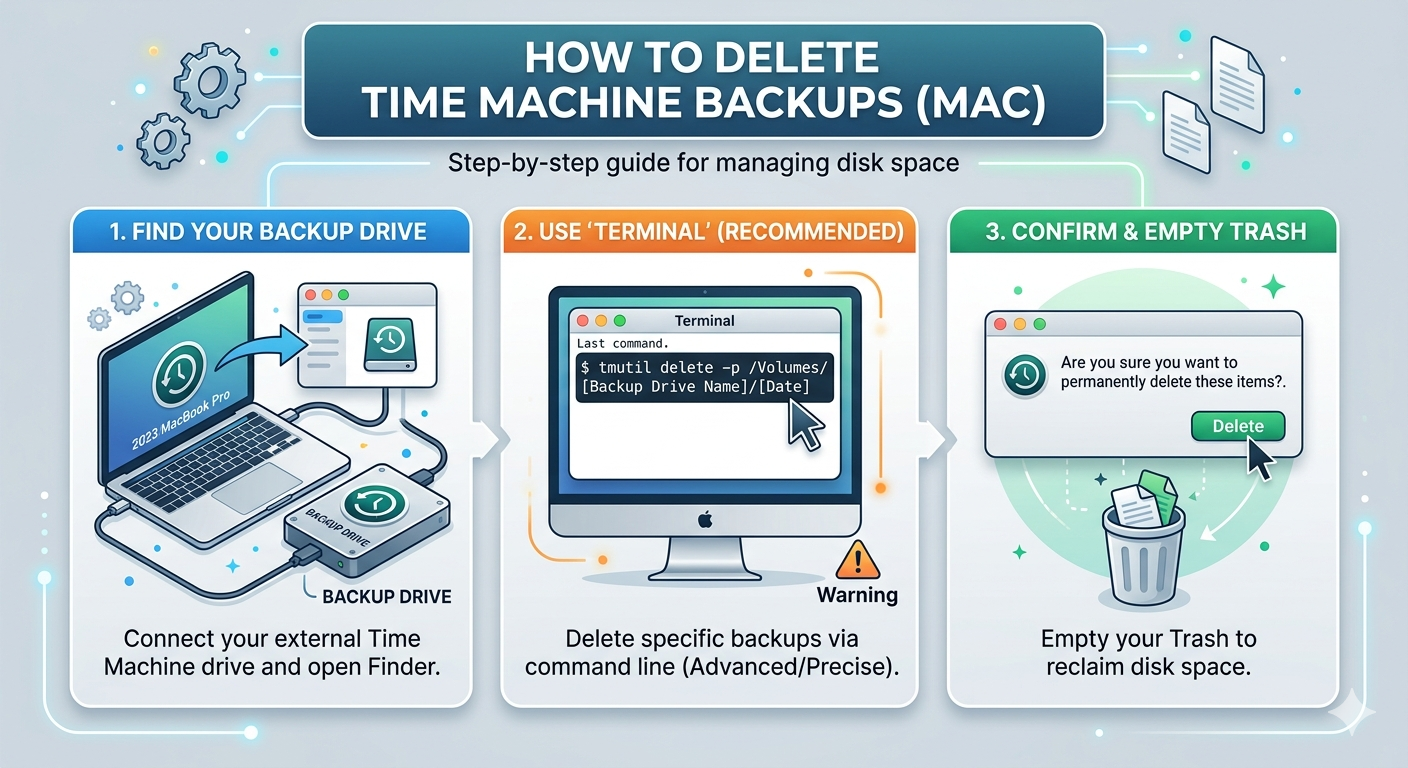
Method 1: Delete Backups Using Time Machine Interface
This is the easiest and safest way for most users.
Steps:
- Connect your Time Machine backup drive
- Click the Time Machine icon in the menu bar
- Select Enter Time Machine
- Navigate to the date of the backup you want to delete
- Click the gear icon (⚙️) or right-click the folder/file
- Choose Delete Backup or Delete All Backups of [item]
- Enter your Mac password to confirm
Method 2: Delete Specific Backups via Finder
You can also remove backups directly from the backup disk.
Steps:
- Open Finder
- Select your Time Machine backup drive
- Open the Backups.backupdb folder
- Locate the backup folder (named by date)
- Right-click and select Move to Trash
- Empty the Trash
⚠️ Note: You may need administrator permissions to delete these files.
Method 3: Delete Backups Using Terminal (Advanced)
For advanced users, Terminal offers more control.
Command:
tmutil delete /Volumes/BackupDrive/Backups.backupdb/YourMacName/YYYY-MM-DD-HHMMSS
Replace the path with your actual backup location.
What If You Accidentally Delete Important Backups?
Deleting the wrong Time Machine backup can lead to permanent data loss – especially if you don’t have another copy. In such situations, using a reliable data recovery tool becomes essential.
Free Data Recovery Software for Mac is a trusted solution that helps recover deleted photos, videos, documents, emails, and more from Time Machine drives, internal disks, and external storage devices. It features an intuitive interface, making it easy for users to recover lost data without technical expertise.
The free version allows you to recover up to 1GB of data and supports modern Mac systems, including those powered by Apple Silicon (M1/M2/T2 chips). It also offers useful features like file preview, selective recovery, and deep scanning to improve recovery results.
Tips Before Deleting Backups
- Make sure you don’t need the data before deleting
- Avoid deleting the most recent backup unless necessary
- Keep an additional backup for critical files
Final Thoughts
Deleting Time Machine backups is a simple way to manage storage and keep your backup drive organized. Whether you prefer using the Time Machine interface, Finder, or Terminal, choose the method that best suits your comfort level. Just be cautious and double-check before removing any important backups.
Promote your articles nowCheck for details
Choose a promotion package
Choose a package below, scan the QR code and pay the displayed amount for 20 days.
After payment, email your article title and payment screenshot to info@yourneeds.asia. Once confirmation is received, one of our administrators will activate the promotion.

Choose where your promoted article receives extra visibility
Promotion changes presentation and placement for the selected period. It does not guarantee traffic, enquiries, search ranking or sales.
Priority visibility in the VIP Lounge, promoted shelves and highlighted article areas.
Top-style highlighting in article directories, homepage feeds and promoted article blocks.
Premium styling across supported article feeds, recommendations and directory placements.
Featured presentation in supported homepage, category, directory and related-article areas.
Build a stronger online presence for your business
Get Your Website for ₹15,000
Are you listed and don't have a website for your business? We can plan, design and launch a responsive website that makes your business easier to understand and contact.
Get My WebsiteSEO Starts from ₹10,000/Month
Improve how your business is presented across Google, local listings and AI-powered search results with ongoing SEO, content and authority-building work.
Improve My VisibilitySuggested Articles
View all articles
HIS Hospital Information System in India: Features, Benefits & Guide
Patient records, lab results, prescriptions, billing hospitals churn through a huge amount of information every single day, and without something holding it all together,…

Search People with ICP Filters: Build Better B2B Prospect Lists Faster
[caption id="attachment_8272" align="alignnone" width="300"] Search People with ICP Filters: Build Better B2B Prospect Lists Faster [/caption] Why Most B2B Prospect Lists Fail Building a…

How Technology is Transforming the Hospitality Industry?
Learn about the most current hospitality industry trends, and discover how technology is changing the guest experience including smart hotels to personalized services. Stay…

ServiceNow ITSM in Pune : Make a Successful IT Career with Techmyindia
With the dynamic growth of the IT industry, there has been an increased demand for skilled and professional IT personnel. Thus, ServiceNow ITSM in…
Latest Blog Posts
View all articles
How to Choose a Reliable Frozen Sweet Potato Fries Supplier?
Choosing the right frozen sweet potato fries supplier is an important decision for distributors, retailers, and foodservice businesses. A reliable supplier should provide consistent…
Ultimate Guide to Buying Frozen Sweet Potato Fries for Foodservice
Introduction Sourcing high-quality frozen sweet potato fries is an important part of successful foodservice operations. Restaurants, foodservice buyers, distributors, and brand managers need to…

From Madhapur Search to AI Discovery Best SEO Company Madhapur Done it right 2026
From Madhapur Search to AI Discovery: How YourNeeds.asia Builds a 360° SEO Visibility Engine for Local Businesses A customer looking for a business in…

BBQ Catering in Karachi: Delicious Grilled Food for Every Occasion
When it comes to outdoor gatherings and celebrations, BBQ is one of the most popular food choices. From family get-togethers and birthday parties to…

Event Press Release: How to Announce and Promote Your Event | BeritaWire
An event press release is a professional announcement used to share important information about an upcoming event with journalists, news websites, media organizations, customers,…

Party Catering in Karachi: Delicious Food for Every Celebration
Planning a party involves many details, but food is one of the most important parts of creating a memorable experience. Whether you are arranging…