
Published: |Last updated:
Listen to this article
Show Quick ReadConcise summary from this article
Introduction Modern homes, offices, and workplaces use multiple USB-powered devices every day. From keyboards and mice to printers, webcams, external hard drives, smartphones, and other accessories, USB connectivity plays an important role in daily activities. However, the USB ports available on computers, laptops, and chargers are not always conveniently located. Sometimes, the connected device is too far away, or the existing cable is too short to reach the required position.…
Ask AI About This Article
Answers are limited to information in this article.
Introduction
Modern homes, offices, and workplaces use multiple USB-powered devices every day. From keyboards and mice to printers, webcams, external hard drives, smartphones, and other accessories, USB connectivity plays an important role in daily activities. However, the USB ports available on computers, laptops, and chargers are not always conveniently located. Sometimes, the connected device is too far away, or the existing cable is too short to reach the required position.
A USB Extension Cable is a practical solution to this problem. It extends the connection between a USB port and a compatible device, making it easier to organize your workspace and connect accessories without moving your computer or other equipment.
In this guide, we will explore different types of USB extension cables, their common uses, important benefits, and the factors to consider before choosing one.
What Is a USB Extension Cable?
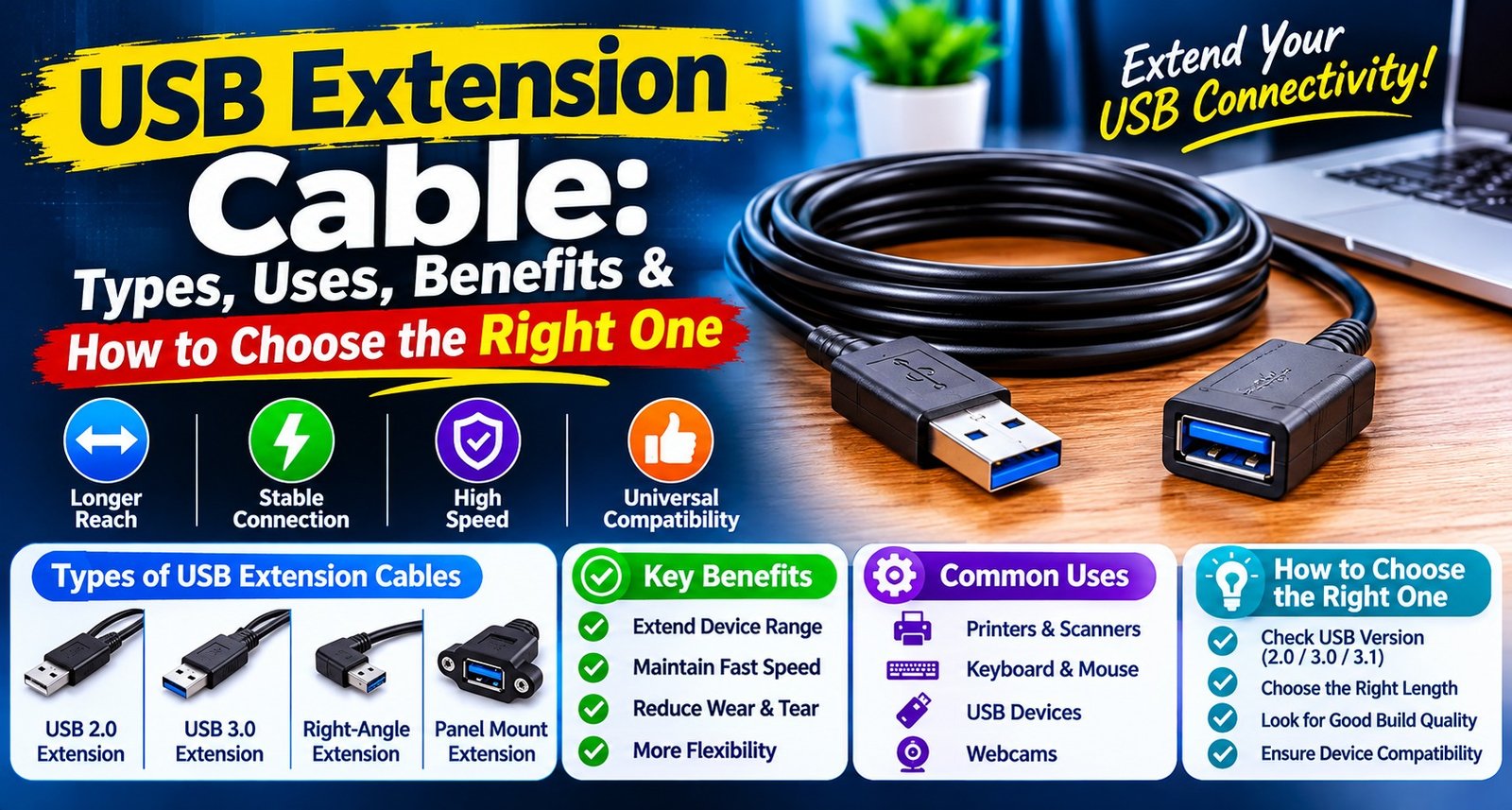
A USB extension cable is designed to increase the distance between an existing USB port and a connected device. It generally features a USB male connector on one end and a USB female port on the other. You can connect the male end to your computer, laptop, charger, or another compatible USB port and plug your existing device cable into the female end.
A USB Extension Cord helps users connect devices placed at a distance while keeping their existing cables and equipment in use. It is particularly useful when USB ports are located behind a desktop computer, under a desk, or in an inconvenient position.
Depending on the cable standard, length, and construction, an extension cable may support data transfer, charging, or both.
Different Types of USB Extension Cables
USB extension cables are available in different versions to meet different connectivity requirements. Understanding these types can help you select a suitable option.
1. USB Male to Female Extension Cables
A USB Male to Female Extension Cable is one of the most common designs. It has a male USB connector on one end and a female USB port on the other.
It allows users to extend an existing USB connection without replacing the original device cable. This type is commonly used with keyboards, mice, printers, USB drives, and other compatible accessories.
2. USB 2.0 Extension Cables
A USB 2.0 Extension Cable is suitable for basic connectivity requirements. USB 2.0 supports a theoretical maximum data transfer rate of 480 Mbps, although actual performance depends on the connected devices and other factors.
It is commonly used for keyboards, mice, printers, and other peripherals that do not require higher data transfer speeds.
3. USB 3.0 Extension Cables
A USB 3.0 Extension Cable is designed for devices that require higher data transfer speeds. USB 3.0 supports a theoretical maximum transfer rate of 5 Gbps.
It can be useful for compatible external storage devices, high-speed USB accessories, and other equipment that benefits from faster data connectivity. Both the extension cable and connected devices must support the required USB standard to achieve the expected performance.
Common Uses of USB Extension Cables
USB extension cables are useful in many everyday situations. Some common applications include:
- Desktop computers: Connect keyboards, mice, webcams, and other accessories conveniently.
- Laptops: Extend the reach of USB ports when connecting external devices.
- Printers: Position printers at a convenient distance from computers.
- External storage: Connect compatible USB flash drives and external hard drives.
- Webcams: Place a webcam in a better position for video calls and meetings.
- Gaming accessories: Connect compatible controllers and other USB peripherals.
- Home entertainment: Extend USB connections for supported media devices and accessories.
A USB Data Extension Cable can help maintain a convenient connection for compatible peripherals while allowing more flexible device placement. Always check the supported USB version and maximum cable length before using it with high-speed equipment.
USB Extension Cable for Charging and Power
USB extension cables can also be used in certain charging arrangements. However, not every extension cable is suitable for every charging requirement.
A USB Charging Extension Cable can extend the physical distance between a compatible USB power source and a device. Its charging performance depends on cable quality, wire thickness, length, connector condition, and the power requirements of the connected device.
For better results, check the supported current and voltage ratings. Longer or lower-quality cables may cause voltage drops and slower charging. Also, remember that an extension cable does not automatically increase the charging speed or power output of the original charger.
Benefits of Using a USB Extension Cable
1. Convenient Connectivity
An extension cable makes it easier to connect USB devices without keeping them directly beside your computer or power source.
2. Better Workspace Organization
It can help position USB accessories where they are easier to access. This is especially useful for desktop setups, office desks, and entertainment areas.
3. Flexible Device Placement
You can place compatible peripherals at a more convenient distance while keeping the main computer or USB port in its original position.
4. Reuse Existing Cables
Instead of purchasing a completely new cable for every connection, you may be able to extend an existing compatible cable.
5. Simple Installation
Most standard USB extension cables are easy to use. Connect the male end to the USB port and attach the existing device cable to the female connector. No additional software is generally required for standard USB connections.
How to Choose the Right USB Extension Cable
Before purchasing an extension cable, consider the following factors.
1. Check the USB Version
Choose a cable that supports the USB standard required by your device. For basic accessories, USB 2.0 may be sufficient, while compatible high-speed devices may benefit from USB 3.0.
2. Select the Appropriate Length
A Long USB Extension Cable can be useful when your device is located far from the computer or power source. However, avoid choosing an unnecessarily long cable because cable length can affect signal quality, data performance, and charging efficiency.
3. Consider Your Device Compatibility
Check the connector type and USB standard supported by your computer, laptop, charger, or peripheral. Make sure the extension cable matches your intended setup.
4. Check Build Quality
Look for durable connectors, properly insulated wires, and reliable outer cable protection. Good construction can help improve durability during regular use.
5. Understand Charging and Data Requirements
Some cables are designed primarily for charging, while others support both charging and data transfer. Confirm the specifications before buying, particularly when connecting external storage or other data-sensitive devices.
6. Consider Your Laptop or Computer Setup
A USB Extension Cable for Computer can be helpful when desktop ports are difficult to access. Similarly, a USB Cable Extender for Laptop can make it easier to connect compatible accessories when the laptop is placed on a stand or in a fixed position.
Common Mistakes to Avoid
Choosing an extension cable without checking its specifications can lead to connection or performance issues. Avoid these common mistakes:
- Selecting a cable without checking USB compatibility.
- Using a cable that does not support the required data transfer speed.
- Choosing an excessively long cable for a high-speed device.
- Ignoring charging current and voltage requirements.
- Using damaged connectors or poorly constructed cables.
- Assuming every extension cable supports both charging and data transfer.
Checking these details before purchase can help you avoid unnecessary connectivity problems.
Conclusion
USB extension cables are simple yet useful accessories that make everyday connectivity more convenient. They help extend the reach of USB ports, improve workspace organization, and allow compatible devices to be positioned more flexibly.
Before choosing one, consider the USB version, cable length, connector type, build quality, and charging or data requirements of your devices. Selecting a compatible cable can help provide a more convenient and reliable USB connection for your home, office, or workstation.
Frequently Asked Questions (FAQs)
1. What is a USB extension cable used for?
A USB extension cable is used to increase the distance between a USB port and a connected device. It helps connect peripherals such as keyboards, mice, printers, webcams, and external storage devices.
2. How does a USB extension cable work?
It connects to an existing USB port through its male connector and provides a female port for another USB cable or compatible device. This extends the physical reach of the connection.
3. Can a USB extension cable transfer data?
Yes, compatible USB extension cables support data transfer. The actual speed depends on the USB standard supported by the cable and connected devices.
4. What is the difference between USB 2.0 and USB 3.0 extension cables?
USB 2.0 supports a theoretical maximum speed of 480 Mbps, while USB 3.0 supports up to 5 Gbps. USB 3.0 is generally more suitable for compatible high-speed devices.
5. Can I use a USB extension cable for charging?
Yes, a compatible cable can extend a USB charging connection. However, charging performance depends on cable quality, length, supported current, and the power source.
6. Does a USB extension cable reduce charging speed?
It can. Longer cables or cables with thinner conductors may cause voltage drops, which can affect charging speed and performance.
7. Can I connect a USB extension cable to a laptop?
Yes, you can connect a compatible extension cable to a laptop’s USB port to extend the reach of supported peripherals and accessories.
8. Can I use a USB extension cable with a printer?
Yes, provided the printer and computer use compatible USB connectors and standards. Check the printer’s connection requirements before choosing a cable.
9. What is a USB male-to-female extension cable?
It is a cable with a male USB connector on one end and a female USB port on the other. It allows users to extend an existing USB connection.
10. How long can a USB extension cable be?
The suitable length depends on the USB standard, cable construction, and connected device. Longer cables may require signal-quality considerations or an active repeater for reliable operation.
11. Can I connect an external hard drive using a USB extension cable?
Yes, if the cable supports the required USB standard and provides a reliable connection. For high-speed storage devices, choose a compatible cable that supports the required data rate.
12. Does a USB extension cable support both charging and data transfer?
Some cables support both functions, while others may be designed primarily for charging. Always check the product specifications before purchasing.
13. Can I connect a USB hub to an extension cable?
Yes, a compatible USB hub can be connected through an extension cable. However, the total connection length, power requirements, and USB standards should be considered.
14. How do I choose the right USB extension cable?
Check the USB version, connector type, cable length, build quality, charging requirements, and data transfer needs of your devices before purchasing.
15. Are USB extension cables compatible with all USB devices?
No, compatibility depends on the connector type, USB standard, power requirements, and device specifications. Always verify compatibility before connecting a device.
Promote your articles nowCheck for details
Choose a promotion package
Choose a package below, scan the QR code and pay the displayed amount for 20 days.
After payment, email your article title and payment screenshot to info@yourneeds.asia. Once confirmation is received, one of our administrators will activate the promotion.
Choose where your promoted article receives extra visibility
Promotion changes presentation and placement for the selected period. It does not guarantee traffic, enquiries, search ranking or sales.
Priority visibility in the VIP Lounge, promoted shelves and highlighted article areas.
Top-style highlighting in article directories, homepage feeds and promoted article blocks.
Premium styling across supported article feeds, recommendations and directory placements.
Featured presentation in supported homepage, category, directory and related-article areas.
Build a stronger online presence for your business
Get Your Website for ₹15,000
Are you listed and don't have a website for your business? We can plan, design and launch a responsive website that makes your business easier to understand and contact.
Get My WebsiteSEO Starts from ₹10,000/Month
Improve how your business is presented across Google, local listings and AI-powered search results with ongoing SEO, content and authority-building work.
Improve My VisibilitySuggested Articles
View all articles
How to Choose the Best AC to DC Power Adapter: Types, Uses & Buying Guide
Electronic devices need a reliable power source to work safely and efficiently. Many devices operate using direct current (DC), while the electricity supplied to…
How to Choose the Best Trolley Stand: Types, Uses, Benefits & Buying Tips
Introduction Choosing the right stand for your home appliances can help improve stability, simplify cleaning, and make better use of available space. Whether you…
How to Choose the Best CCTV Cable: Types, Uses, Benefits & Installation Tips
A reliable CCTV system depends on more than cameras and recording equipment. The cable connecting each component plays an important role in video transmission,…

Farmvale Psyllium | Global Psyllium Husk, Powder & Seeds Manufacturer, Supplier and Exporter
Farmvale Psyllium, a division of Veerral Agro Tech and Organic Products India, is a leading Psyllium Husk Manufacturer, Supplier, and Exporter in India, based…
Latest Blog Posts
View all articles
How to Choose the Best Hair Clinic in Delhi: 7 Important Factors to Consider
Top Hair Treatments in Delhi for Men and Women – Emara Skin Clinic Hair fall and hair thinning are common concerns affecting both men…

How Smart Contract Development: Building Secure and Automated Blockchain Solutions
Blockchain technology is transforming how businesses manage transactions, agreements, and digital assets. One of the key technologies driving this transformation is smart contracts. These…

NRI Income Tax Return Filing in India | NRI ITR Services
NRI Income Tax Return Filing in India: A Complete Guide for NRIs, OCIs and Expats Living abroad does not always mean that you are…

What Should You Consider Before Buying a Studio Apartment in Goa?
Goa is a popular choice for people looking for a second home, a holiday property, or a place to enjoy a relaxed lifestyle. From…

Property for Sale in Kuala Lumpur: The Ultimate Guide to Finding Your Dream Property in 2026
Property for Sale in Kuala Lumpur Kuala Lumpur remains one of Malaysia's most attractive destinations for property buyers, investors and individuals looking for a…

Why Your Brand Needs Professional Content Marketing Services
[caption id="attachment_9158" align="alignnone" width="300"] Learn why brands need content marketing services to build their online presence.[/caption] Imagine opening a premium store in the busiest…