
Published: |Last updated:
Listen to this article
Show Quick ReadConcise summary from this article
Microsoft Dynamics 365 vs. Microsoft Dynamics AX: Key Differences for Businesses Businesses using Microsoft enterprise software often face an important decision: continue operating with Microsoft Dynamics AX or move toward Microsoft Dynamics 365? Both platforms support essential business operations, including finance, supply chain management, inventory, procurement, and enterprise resource planning (ERP). However, they differ in deployment models, architecture, integration capabilities, and long-term development. Microsoft Dynamics AX was designed as an…
Ask AI About This Article
Answers are limited to information in this article.
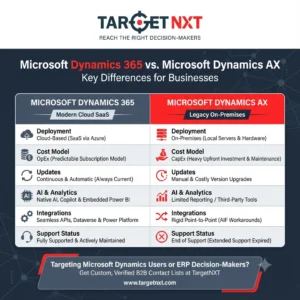
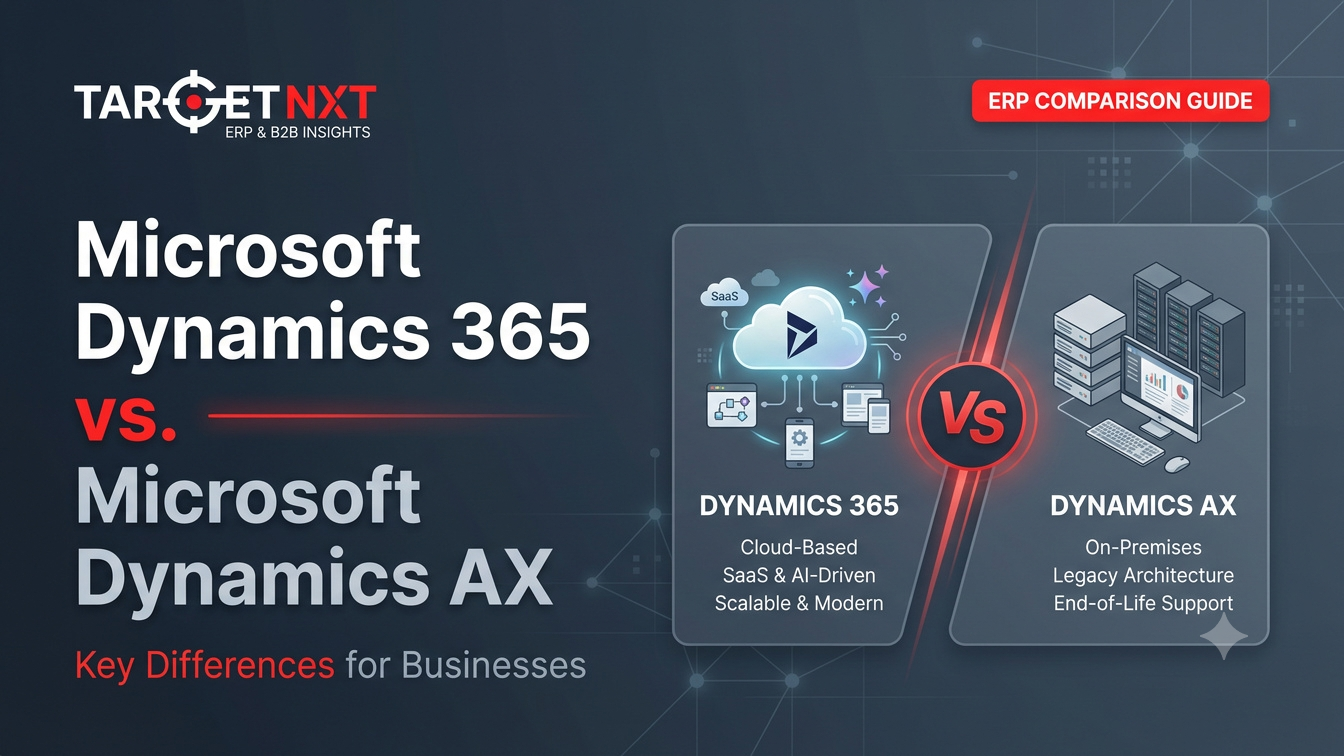
Compare Microsoft Dynamics 365 (Modern Cloud SaaS) and Microsoft Dynamics AX (Legacy On-Premises) across deployment, cost model, updates, AI & analytics, integrations, and support status—then connect with verified ERP decision-makers at TargetNXT.
Microsoft Dynamics 365 vs. Microsoft Dynamics AX: Key Differences for Businesses
Businesses using Microsoft enterprise software often face an important decision: continue operating with Microsoft Dynamics AX or move toward Microsoft Dynamics 365? Both platforms support essential business operations, including finance, supply chain management, inventory, procurement, and enterprise resource planning (ERP). However, they differ in deployment models, architecture, integration capabilities, and long-term development.
Microsoft Dynamics AX was designed as an enterprise ERP solution that helps organizations manage complex business processes through a centralized system. Microsoft Dynamics 365 represents Microsoft’s broader cloud-oriented business application ecosystem, combining ERP and customer relationship management (CRM) capabilities with integration across other Microsoft services.
Understanding the differences between these platforms helps IT leaders, ERP consultants, operations teams, and business decision-makers evaluate technology investments and modernization opportunities.
What Is Microsoft Dynamics AX?
Microsoft Dynamics AX is an enterprise resource planning platform developed to help medium-sized and large organizations manage business operations through integrated applications.
The platform supports multiple business functions, allowing organizations to manage financial activities, production, procurement, inventory, distribution, and supply chain processes within a connected environment.
Businesses commonly use Dynamics AX for:
- Financial management and accounting
- Inventory and warehouse management
- Manufacturing and production planning
- Procurement and vendor management
- Supply chain operations
- Project management and reporting
- Business process automation
Dynamics AX has been deployed in organizations with complex operational requirements, particularly in manufacturing, distribution, retail, and professional services.
Organizations that continue using older Dynamics AX environments may maintain customized workflows and integrations that support established business processes.
Companies interested in identifying organizations using this technology can explore the Microsoft Dynamics AX Users List.
What Is Microsoft Dynamics 365?
Microsoft Dynamics 365 is a collection of cloud-based and, depending on the application, other deployment options for enterprise resource planning and customer relationship management.
Unlike a single ERP application, Dynamics 365 consists of multiple business applications designed to support specific operational functions.
These applications help organizations connect financial management, sales, customer service, supply chain operations, field services, and other business processes.
Some important Dynamics 365 applications include:
- Dynamics 365 Finance
- Dynamics 365 Supply Chain Management
- Dynamics 365 Sales
- Dynamics 365 Customer Service
- Dynamics 365 Field Service
- Dynamics 365 Business Central
Organizations can select applications based on their operational requirements rather than relying on a single system for every business function.
For example, a company may use Dynamics 365 Finance for financial operations and Dynamics 365 Sales for managing customer relationships and sales activities.
Businesses interested in this technology can explore the Microsoft Dynamics 365 Users List.
Microsoft Dynamics 365 vs. Dynamics AX: Key Differences
Although both platforms support enterprise business operations, their architecture, deployment approaches, application structure, and integration capabilities differ.
The following table highlights the major differences.
| Platform structure | Integrated enterprise ERP platform | Suite of connected business applications |
| Deployment | Primarily associated with on-premises deployments, depending on version | Cloud-first, with application-specific deployment options |
| Architecture | Earlier generation enterprise ERP architecture | Modern application architecture with cloud services |
| Business applications | Finance, manufacturing, inventory, procurement and operations | Finance, supply chain, sales, customer service and more |
| Updates | Often managed through customer or partner upgrade projects | Regular service updates, depending on application |
| Integration | Supports enterprise integrations and Microsoft technologies | Integrates with Microsoft cloud services and other business applications |
| Customization | Often includes extensive customizations in established installations | Supports extensions and platform-based customization approaches |
| Analytics | Reporting and business intelligence capabilities | Integration with modern Microsoft analytics and reporting services |
| Scalability | Depends on infrastructure and implementation | Cloud-oriented scalability options |
| Modernization | May require upgrade or migration planning | Supports ongoing application and platform development |
The best choice depends on the organization’s existing infrastructure, business requirements, customization requirements, and long-term technology strategy.
1. Deployment and Infrastructure
One of the major differences between Dynamics AX and Dynamics 365 is their deployment approach.
Traditional Dynamics AX implementations are commonly associated with on-premises infrastructure. Organizations typically manage servers, databases, application environments, maintenance, and infrastructure upgrades.
This approach gives businesses control over their technology environment but also requires ongoing infrastructure management.
Dynamics 365 applications are designed around Microsoft’s cloud services, although deployment options vary by product. Organizations can use Microsoft’s cloud infrastructure to reduce the operational burden associated with maintaining traditional ERP environments.
For businesses evaluating modernization, the deployment model can influence infrastructure costs, security planning, maintenance requirements, and IT resource allocation.
2. ERP and Business Management Capabilities
Both platforms support essential enterprise resource planning activities, but Dynamics 365 offers a broader application ecosystem.
Dynamics AX supports core ERP processes such as:
- Financial management
- Procurement
- Manufacturing
- Inventory management
- Warehouse operations
- Supply chain planning
Dynamics 365 extends these capabilities through dedicated applications.
For example, Dynamics 365 Finance supports financial operations, while Dynamics 365 Supply Chain Management helps organizations coordinate procurement, inventory, manufacturing, and distribution activities.
Businesses can also explore the Microsoft Dynamics 365 Supply Chain Management Users List to identify organizations associated with this specific application.
3. CRM and Customer Management Integration
Another important distinction is the broader connection between ERP and CRM applications.
Dynamics AX primarily focuses on enterprise resource planning and operational management.
Dynamics 365 includes dedicated CRM applications that help organizations manage sales pipelines, customer interactions, service requests, and customer engagement activities.
Dynamics 365 Sales, for example, supports lead management, opportunity tracking, sales forecasting, and customer relationship management.
Businesses exploring this application can refer to the Microsoft Dynamics 365 Sales Users List.
Organizations evaluating CRM technology can also explore the Microsoft Dynamics CRM Users List.
4. Integration With the Microsoft Ecosystem
Modern business operations depend on communication between ERP, CRM, productivity, analytics, and cloud infrastructure systems.
Dynamics AX supports integrations with various enterprise technologies, depending on the version and implementation.
Dynamics 365 offers broader integration opportunities across Microsoft’s business ecosystem, including:
- Microsoft Azure
- Microsoft Power Platform
- Microsoft Power BI
- Microsoft 365
- Microsoft Dataverse
- Other supported enterprise applications
These integrations can help organizations connect operational data, automate workflows, and improve business reporting.
For companies managing multiple Microsoft technologies, understanding the existing technology environment is important when planning software upgrades, integrations, and enterprise technology investments.
5. Customization, Maintenance, and Updates
Customization is another important consideration when comparing the two platforms.
Many long-standing Dynamics AX implementations contain custom modules, business rules, integrations, and workflows developed around specific operational requirements.
Although these customizations can support established processes, they may increase the complexity of upgrades and modernization projects.
Dynamics 365 follows a more modern application development and extension approach. Its applications receive ongoing updates, although the available customization and update processes differ across products.
Before moving from AX to Dynamics 365, organizations should evaluate existing customizations, integrations, data structures, and business processes.
A detailed assessment can help determine which components should be retained, redesigned, replaced, or retired.
Microsoft Dynamics AX to Dynamics 365: What Should Businesses Consider?
Moving from Dynamics AX to Dynamics 365 is not simply a software replacement exercise. It requires planning around business processes, technical dependencies, data, integrations, and user requirements.
Organizations should consider the following areas before beginning a modernization project.
1. Existing system assessment
Review the current Dynamics AX version, infrastructure, customizations, integrations, and business-critical workflows.
2. Application requirements
Identify which Dynamics 365 applications match existing business requirements. Some organizations may need Finance and Supply Chain Management, while others may also require Sales or Customer Service.
3. Data migration
Evaluate the quality, structure, and volume of existing business data. Determine which records need to be migrated, archived, cleaned, or transformed.
4. Integration planning
Identify connections with CRM systems, financial applications, warehouse platforms, analytics tools, and other enterprise software.
5. Employee training
Prepare employees for changes in application interfaces, workflows, reporting, and operational procedures.
6. Long-term technology strategy
Evaluate future scalability, maintenance requirements, security, application updates, and the organization’s broader digital transformation objectives.
A structured migration strategy helps reduce disruption and ensures that the new environment supports actual business requirements.
Which Businesses Use Microsoft Dynamics 365 and Dynamics AX?
Both platforms are relevant to organizations managing complex business operations, although their adoption patterns and implementation requirements can differ.
Industries that commonly use Microsoft enterprise ERP and CRM technologies include:
| Manufacturing | Production planning, inventory, procurement, and supply chain management |
| Retail and Ecommerce | Order management, inventory tracking, and financial operations |
| Wholesale Distribution | Warehouse management, purchasing, and distribution |
| Professional Services | Financial management, project operations, and resource planning |
| Healthcare | Financial operations, procurement, and administrative workflows |
| Automotive | Manufacturing, supplier management, and inventory operations |
| Food and Beverage | Production management, distribution, and supply chain coordination |
For technology vendors, consultants, software providers, and B2B marketers, identifying companies using these applications can help improve account research and audience targeting.
How to Identify Businesses Using Microsoft Dynamics Technologies
Understanding which organizations use specific enterprise applications can support more focused B2B marketing and sales activities.
Technology adoption information can help businesses identify potential accounts based on their existing software environments.
For example:
- ERP consultants can identify organizations operating Microsoft ERP platforms.
- Software vendors can discover businesses with relevant technology requirements.
- IT service providers can develop account lists based on installed technology environments.
- Marketing teams can segment prospects according to their business software adoption.
- Sales development teams can prioritize organizations that match their ideal customer profiles.
TargetNXT provides technology users lists and B2B contact intelligence to support technology-based prospecting and account research.
Businesses looking to reach organizations using Microsoft enterprise applications can explore the Microsoft Dynamics 365 Users List and the Microsoft Dynamics AX Users List.
The broader Microsoft technology users database can also support research across Microsoft’s enterprise technology ecosystem.
Frequently Asked Questions
1. Is Microsoft Dynamics 365 the same as Dynamics AX?
No. Dynamics AX is an earlier-generation enterprise ERP platform, while Dynamics 365 is a broader collection of business applications covering ERP, CRM, and other business functions.
2. Is Microsoft Dynamics AX being replaced by Dynamics 365?
Microsoft has transitioned its enterprise ERP strategy toward Dynamics 365. Dynamics 365 Finance and Dynamics 365 Supply Chain Management are important successors in the enterprise ERP product family. However, migration requirements depend on the specific AX version and business environment.
3. Can businesses migrate from Dynamics AX to Dynamics 365?
Yes. Organizations can move from eligible Dynamics AX environments to relevant Dynamics 365 applications. The migration approach depends on the AX version, customization, integrations, data requirements, and target application.
4. What is the difference between Dynamics AX and Dynamics 365 Finance?
Dynamics AX is an earlier enterprise ERP platform with multiple operational capabilities. Dynamics 365 Finance is a dedicated application focused on financial management, accounting, budgeting, and related financial processes.
5. Which industries use Microsoft Dynamics 365?
Manufacturing, retail, distribution, professional services, healthcare, automotive, and food and beverage organizations can use Dynamics 365 applications for financial management, customer relationships, supply chain operations, and other business processes.
6. How can businesses find companies using Microsoft Dynamics 365?
Businesses can use technographic data and B2B technology intelligence to identify organizations associated with Microsoft Dynamics 365. TargetNXT offers a Microsoft Dynamics 365 Users List to support technology-based prospecting.
Final Thoughts
Microsoft Dynamics AX and Dynamics 365 both play important roles in enterprise business management, but they represent different generations of Microsoft’s business application strategy.
Dynamics AX remains relevant to organizations operating established ERP environments, while Dynamics 365 provides a broader application ecosystem with cloud-oriented capabilities, ongoing development, and integration opportunities.
For businesses evaluating ERP modernization, technology investments, or B2B prospecting opportunities, understanding which Microsoft applications organizations use can provide valuable insight into their technology environments.
Explore TargetNXT’s Microsoft Dynamics 365 Users List to find technology-based audience data for your B2B research and outreach initiatives.
Promote your articles nowCheck for details
Choose a promotion package
Choose a package below, scan the QR code and pay the displayed amount for 20 days.
After payment, email your article title and payment screenshot to info@yourneeds.asia. Once confirmation is received, one of our administrators will activate the promotion.

Choose where your promoted article receives extra visibility
Promotion changes presentation and placement for the selected period. It does not guarantee traffic, enquiries, search ranking or sales.
Priority visibility in the VIP Lounge, promoted shelves and highlighted article areas.
Top-style highlighting in article directories, homepage feeds and promoted article blocks.
Premium styling across supported article feeds, recommendations and directory placements.
Featured presentation in supported homepage, category, directory and related-article areas.
Build a stronger online presence for your business
Get Your Website for ₹15,000
Are you listed and don't have a website for your business? We can plan, design and launch a responsive website that makes your business easier to understand and contact.
Get My WebsiteSEO Starts from ₹10,000/Month
Improve how your business is presented across Google, local listings and AI-powered search results with ongoing SEO, content and authority-building work.
Improve My VisibilitySuggested Articles
View all articles
Why Growing UK and European Businesses Are Moving Towards Cloud ERP with Dynamics 365 Business Central
Why Growing UK and European Businesses Are Moving Towards Cloud ERP with Dynamics 365 Business Central Growing businesses across the UK, Europe, Germany, and…

MVP Development Services: How Startups Can Build, Launch, and Learn Faster
A new product idea can sound convincing in a planning meeting, but customers decide whether it solves a real problem. MVP development services help…
AWS Users Email List: 7 Powerful UK Cloud Trends
The AWS Users Email List is a valuable resource for businesses looking to connect with organisations adopting cloud technologies across the UK. As companies…
Property Management Software in UAE: A Guide for Landlords and Property Managers
Managing rental properties in the UAE involves coordinating tenants, rental payments, lease agreements, maintenance activities, and financial records. For landlords with a few apartments,…
Latest Blog Posts
View all articles
How AI, Personalisation and Digital Booking Are Transforming Travel Agencies in 2026
The travel industry is adapting to changing traveller expectations, digital booking habits and growing interest in personalised experiences. Across the UK, Europe, Germany and…

How to Choose the Right Residential Project in Gurgaon: Location, Connectivity and Lifestyle Compared
Gurgaon has become an important residential destination for people working in Delhi NCR. Its expanding road infrastructure, corporate presence and range of residential developments…

Inside the Samsung Dealers Chandigarh Market and the Best Offers It Holds
Simply stroll through any crowded phone market in the city, and you'll see how many shelves feature a Galaxy box. From the big stores…

Best Sectors to Invest in Greater Noida: A Location-Wise Guide for 2027
Greater Noida has become an important real estate destination in the National Capital Region (NCR). Planned development, improving road connectivity, educational institutions, industrial areas…

What Amenities Should You Look for When Choosing a Luxury Farmhouse Community in Rajasthan?
A luxury farmhouse community should offer more than attractive landscaping and an impressive entrance gate. Buyers investing in countryside properties need to understand whether…
Choosing an OB-GYN Clinic: What to Ask and How to Prepare for Your First Visit
Whether you are scheduling a first gynecology visit, looking for prenatal care or simply need a new clinic after a move, choosing an OB-GYN…