
Published: |Last updated:
Listen to this article
Show Quick ReadConcise summary from this article
Inbound marketing automation helps businesses attract, nurture, and convert prospects through personalized workflows that respond to customer behavior. By connecting content, email, CRM data, and automation rules, businesses can reduce repetitive work while creating more relevant experiences for potential customers. Generating leads is only the beginning of the customer journey. The bigger challenge is staying connected with those leads, understanding their interests, and guiding them toward a purchase without overwhelming…
Ask AI About This Article
Answers are limited to information in this article.
Inbound marketing automation helps businesses attract, nurture, and convert prospects through personalized workflows that respond to customer behavior. By connecting content, email, CRM data, and automation rules, businesses can reduce repetitive work while creating more relevant experiences for potential customers.
Generating leads is only the beginning of the customer journey. The bigger challenge is staying connected with those leads, understanding their interests, and guiding them toward a purchase without overwhelming them. When handled manually, this process can become difficult as the audience grows. Follow-ups may be delayed, important interactions can be missed, and marketing teams may spend too much time performing repetitive tasks.
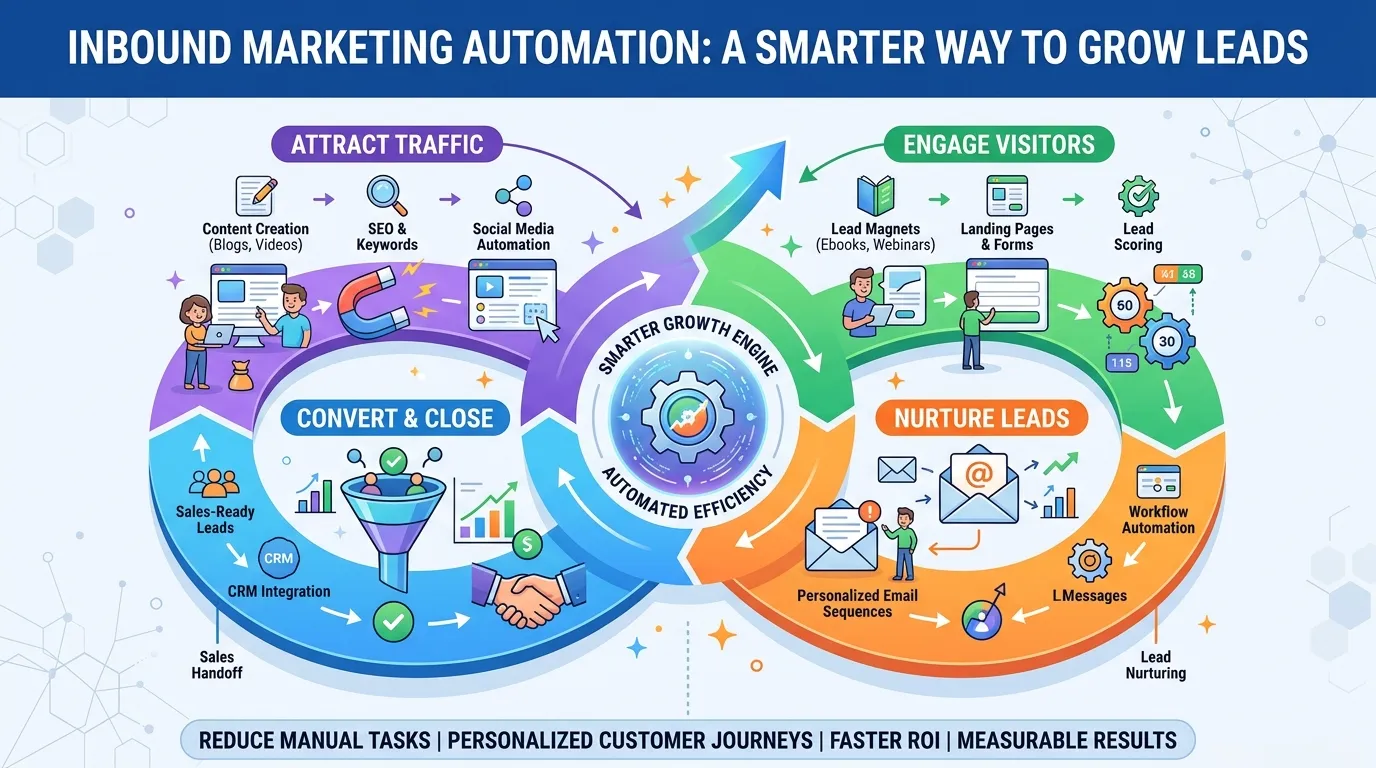
Inbound marketing automation provides a practical solution. Instead of manually sending every email or checking every interaction, businesses can create workflows that respond automatically when prospects take specific actions. A visitor who downloads a guide, for example, can receive a follow-up email with related information. If that person continues engaging, the system can provide more advanced content or notify a sales representative when buying intent becomes stronger.
The goal is not to remove people from marketing. It is to use technology for repetitive activities so marketing and sales teams have more time for strategy, conversations, and customer relationships.
How Inbound Marketing Automation Works
Inbound marketing automation combines customer data with predefined rules and behavioral triggers. Rather than sending the same message to every contact, the system uses information about a person’s actions and interests to determine what should happen next.
The process usually begins when someone discovers a business through search engines, social media, a blog post, a referral, or another inbound channel. The visitor may then download a resource, subscribe to an email list, register for a webinar, or complete a form. That action provides the business with permission to continue the conversation.
From there, an automated workflow can deliver useful content based on the person’s interests. Someone who downloads a beginner’s guide might receive educational articles first, while someone who visits a pricing page several times may be ready for a product comparison or sales conversation.
As the prospect continues interacting with the business, the system collects additional information. Email clicks, page visits, content downloads, and form submissions can all help determine engagement. This information can then be used to personalize future communication and identify prospects who are becoming more likely to convert.
After a customer makes a purchase, automation can continue to support onboarding, customer education, feedback collection, and retention. This makes automation useful throughout the customer lifecycle rather than only during lead generation.
Understanding Automation Triggers
Triggers are events that start an automated workflow. They allow a system to react to customer behavior instead of relying entirely on fixed schedules.
For example, a workflow could begin when someone downloads an ebook, subscribes to a newsletter, registers for an event, visits a pricing page, or reaches a particular lead score. A separate workflow might start when an existing subscriber stops engaging with emails for several weeks.
The value of triggers comes from context. A person who has only read one blog post should not necessarily receive the same message as someone who has visited several product pages and downloaded multiple resources. Behavioral triggers help businesses recognize those differences.
Building an Effective Automation Strategy
Successful automation starts with strategy rather than software. Before creating workflows, businesses need to understand who they are targeting, what those people need, and what action the business ultimately wants them to take.
One of the most useful starting points is mapping the buyer journey. Prospects at the awareness stage usually need educational information that helps them understand a problem. People in the consideration stage may want comparisons, case studies, or detailed guides. Those closer to a decision may need pricing information, demonstrations, testimonials, or a direct conversation with sales.
Understanding these stages helps businesses create workflows that feel natural. Instead of repeatedly promoting a product, the system can provide information that matches the prospect’s current level of interest.
Audience segmentation is equally important. Contacts can be grouped based on industry, company size, location, previous behavior, lead source, purchase history, or engagement. A business serving both small companies and enterprise customers, for example, may create different workflows for each audience because their needs and buying processes are likely to be different.
Every workflow should also have a clear purpose. One sequence might be designed to generate demo requests, another to educate new subscribers, and another to bring inactive customers back. Keeping each workflow focused makes performance easier to measure and improve.
Best Practices for Inbound Marketing Automation
Automation works best when it improves the customer experience rather than simply increasing the number of messages being sent. A well-designed workflow should feel helpful, timely, and relevant.
Start by creating content around genuine customer questions. If an automated email contains little value, automation will only deliver weak content faster. Useful guides, case studies, tutorials, research, and educational articles give prospects a reason to continue engaging with the brand.
Personalization should also go beyond adding someone’s first name to an email. The content itself should reflect what the person has shown interest in. Someone who repeatedly engages with SEO content, for example, should receive information related to SEO rather than unrelated promotional material.
Timing is another important consideration. Sending too many messages in a short period can cause fatigue and increase unsubscribes. Giving prospects enough time to read, consider, and respond creates a more comfortable experience.
Finally, maintain a human tone. Automated communication should still sound like it was written for people. Clear language, natural messaging, and relevant examples can make automated emails feel much less mechanical.
Choosing the Right Automation Tools
The right platform depends on the size of the business, budget, marketing goals, and existing technology. Some businesses need a complete marketing and CRM platform, while others primarily need email automation and basic segmentation.
HubSpot is a popular option for companies looking for an integrated CRM, marketing automation, landing pages, email tools, and reporting. ActiveCampaign is another strong choice for businesses that place greater emphasis on email automation and customer journeys. Enterprise organizations may consider platforms such as Adobe Marketo or Salesforce Marketing Cloud for more advanced automation and complex customer data requirements.
E-commerce companies may benefit from platforms such as Klaviyo, particularly when behavioral data and purchase activity are central to their marketing strategy. Smaller businesses may prefer simpler platforms such as Mailchimp if their needs are limited to email campaigns and basic automation.
The most important consideration is not how many features a platform offers. It is whether your team can use the system effectively. CRM integration, workflow flexibility, reporting, segmentation, and reliable data synchronization should be considered before making a decision.
Creating Inbound Marketing Workflows
Workflows are where inbound marketing automation becomes practical. They connect customer actions with specific marketing responses.
Consider a B2B software company that offers an ebook about reducing customer churn. When someone downloads the ebook, the system can send the resource immediately and introduce the company.
A few days later, the contact could receive a case study showing how another company addressed a similar problem. The next message could provide a detailed article with practical strategies. If the prospect continues engaging, the workflow could introduce a product demonstration or consultation.
If the prospect does not respond, the system does not have to continue sending the same messages indefinitely. It can adjust the sequence, offer a different resource, or eventually move the contact into a re-engagement campaign.
This approach makes the customer journey more flexible. Instead of forcing everyone through the exact same sequence, the workflow can change based on what each person does.
Re-Engaging Inactive Leads
Not every prospect is ready to buy when they first enter a database. Some may become inactive because their priorities change, while others may simply need more time.
Re-engagement workflows give businesses an opportunity to reconnect with these contacts. A simple sequence might remind the subscriber about the value of the brand, introduce a useful new resource, or highlight an important update.
The purpose should not be to send increasingly aggressive promotions. A better approach is to give inactive subscribers a useful reason to engage again. If they still do not respond, removing them from regular campaigns can improve list quality and reduce unnecessary communication.
Using Automation for Lead Generation
Inbound marketing automation can strengthen lead generation by connecting content discovery with immediate follow-up. When someone completes a form or downloads a resource, an automated response can arrive while the business is still fresh in their mind.
This is particularly valuable because delays can cause interested prospects to lose momentum. Automation ensures that every new lead receives an appropriate first response without requiring someone on the marketing team to manually monitor every submission.
Lead scoring can make this process even more effective. A scoring system assigns values to different actions and characteristics. A pricing-page visit might indicate stronger intent than a general blog visit, while downloading a detailed case study may show more interest than simply opening an email.
As contacts accumulate engagement points, the system can identify those who are becoming more qualified. Once a lead reaches a predefined threshold, the system can notify sales or move the person into a higher-intent workflow.
Lead scoring should be reviewed regularly, however. If the scoring model does not accurately reflect buying intent, sales teams may receive too many weak leads or miss valuable opportunities.
Email Automation for Inbound Marketing
Email remains an important part of inbound marketing automation because it allows businesses to continue communicating with people after they have voluntarily provided their contact information.
A welcome sequence is often a good place to start. The first message can deliver the promised resource and introduce the brand. Later messages can provide useful educational content, answer common questions, and gradually introduce relevant products or services.
Drip campaigns can also guide prospects through a longer learning process. Instead of sending all information at once, businesses can distribute useful content over several days or weeks.
Behavior-based emails can be even more relevant because they respond to specific actions. Someone who visits a product page may receive additional information about that product, while someone who registers for a webinar can automatically receive reminders and follow-up material.
Re-engagement emails can target subscribers who have stopped interacting with campaigns. The goal is to determine whether they still want to receive communication and provide a useful reason to return.
The performance of these sequences should be evaluated using more than open rates. Click-through rates, conversions, unsubscribes, qualified leads, sales opportunities, and revenue provide a much clearer picture of whether an automated workflow is contributing to business growth.
Connecting CRM With Marketing Automation
CRM integration turns marketing automation into a more complete customer management system. Without a CRM connection, marketing data and sales information can remain separated.
With integration, marketing teams can see which contacts are engaging with content while sales teams can understand the marketing activity behind a lead. When a prospect becomes highly engaged, the system can send relevant information to the CRM and notify the appropriate sales representative.
The relationship also works in the opposite direction. When a prospect becomes a customer, the CRM can update their marketing status so they no longer receive lead-nurturing emails designed for prospects.
A strong integration should support reliable data synchronization, lead assignment, activity tracking, sales notifications, and workflow updates based on deal stages. Clean data is essential because inaccurate or duplicated information can cause the wrong messages to be sent.
Measuring Automation Performance
Creating automated workflows is only the beginning. Businesses need to measure their performance and use the results to improve the customer journey.
Lead-to-customer conversion rate is one of the most important metrics because it shows whether leads are actually progressing toward revenue. Time to conversion can reveal how long prospects typically take to move from their first interaction to a purchase.
Email engagement can help identify weak points within a workflow. If engagement suddenly drops after a particular message, the content, timing, or offer may need improvement.
Marketing and sales teams should also monitor the percentage of marketing-qualified leads that become sales-qualified leads. A low conversion rate may indicate that the lead scoring model or qualification criteria need adjustment.
Ultimately, revenue attributed to automated campaigns provides the strongest connection between automation and business results. Tracking campaign sources and CRM activity can help businesses understand which workflows are influencing actual sales.
Common Automation Mistakes
One of the biggest mistakes is automating too much too quickly. Businesses sometimes create complicated workflows with dozens of branches before understanding how their audience behaves. This can make campaigns difficult to manage and harder to troubleshoot.
Starting with a few simple workflows is usually more effective. A welcome sequence, lead-nurturing workflow, and re-engagement campaign can provide enough data to understand what works before adding more complexity.
Another common problem is excessive communication. Automation makes it easy to send messages, but that does not mean every action should trigger an email. Businesses should consider whether each message provides meaningful value.
Poor segmentation can create another problem. When every contact receives the same content regardless of their interests or stage, the experience becomes less relevant.
Finally, businesses should avoid treating automation as a replacement for human interaction. Automation can identify opportunities and handle repetitive communication, but sales conversations, customer support, and complex questions still benefit from human involvement.
Building a Scalable Inbound System
The strongest inbound marketing automation strategies develop gradually. Start with one audience, one business objective, and a small number of workflows. Once those workflows generate useful data, use the results to improve messaging, segmentation, timing, and lead scoring.
Over time, businesses can introduce additional workflows for different buyer personas, products, customer segments, and lifecycle stages. Automation can eventually support the entire journey, from first website visit to lead generation, sales qualification, onboarding, retention, and reactivation.
The real advantage comes from combining automation with useful content and accurate customer data. Software alone cannot create a successful inbound strategy. It simply provides the infrastructure that allows a strong strategy to operate consistently at scale.
Conclusion
Inbound marketing automation gives businesses a practical way to manage growing audiences without relying entirely on manual marketing tasks. By connecting customer behavior with relevant content, email sequences, CRM data, and timely follow-up, businesses can create smoother experiences while improving the efficiency of their marketing teams.
The most effective systems are not necessarily the most complicated. They are built around clear goals, useful content, accurate segmentation, thoughtful timing, and continuous measurement.
Start with a simple workflow, learn from customer behavior, and expand gradually. When automation supports rather than replaces human communication, it can become a reliable growth system that attracts better leads, strengthens relationships, and helps businesses turn more prospects into long-term customers.
Frequently Asked Questions
What is inbound marketing automation?
Inbound marketing automation uses software to automate activities such as email follow-ups, lead nurturing, segmentation, and lead scoring based on customer behavior. It helps businesses communicate with prospects more consistently while reducing repetitive manual work.
How is inbound automation different from outbound automation?
Inbound automation generally responds to actions a prospect has already taken, such as downloading content or visiting a website. Outbound automation is typically used to proactively reach audiences that may not have interacted with the business before.
What is the best automation tool for a small business?
The right platform depends on the business’s needs and budget. HubSpot can be useful for businesses wanting an integrated CRM and marketing platform, while ActiveCampaign can be a strong option for teams that primarily need advanced email automation.
How long does it take to see results?
Some businesses can see improvements in engagement within the first few weeks. More meaningful improvements in conversion rates and revenue usually require several months of testing, optimization, and sufficient customer data.
What is lead scoring?
Lead scoring assigns points to contacts based on characteristics and behaviors that indicate potential buying intent. When a lead reaches a certain score, the system can trigger a sales notification or move the contact into another workflow.
Can inbound automation work without a CRM?
Basic automation can work without a CRM, but CRM integration provides a much more complete view of the customer journey. It allows marketing and sales teams to share contact information, activity history, lead status, and deal information.
How much does inbound marketing automation cost?
Costs vary depending on the platform, number of contacts, features, and business requirements. Some tools offer free or low-cost plans, while advanced enterprise platforms can cost significantly more. The best choice should be based on business needs and expected value rather than price alone.
Promote your articles nowCheck for details
Choose a promotion package
Choose a package below, scan the QR code and pay the displayed amount for 20 days.
After payment, email your article title and payment screenshot to info@yourneeds.asia. Once confirmation is received, one of our administrators will activate the promotion.
Choose where your promoted article receives extra visibility
Promotion changes presentation and placement for the selected period. It does not guarantee traffic, enquiries, search ranking or sales.
Priority visibility in the VIP Lounge, promoted shelves and highlighted article areas.
Top-style highlighting in article directories, homepage feeds and promoted article blocks.
Premium styling across supported article feeds, recommendations and directory placements.
Featured presentation in supported homepage, category, directory and related-article areas.
Build a stronger online presence for your business
Get Your Website for ₹15,000
Are you listed and don't have a website for your business? We can plan, design and launch a responsive website that makes your business easier to understand and contact.
Get My WebsiteSEO Starts from ₹10,000/Month
Improve how your business is presented across Google, local listings and AI-powered search results with ongoing SEO, content and authority-building work.
Improve My VisibilitySuggested Articles
View all articles
Mastering Facebook Ads: Selecting the Right Target Audience
Building the right target audience is one of the most important parts of successful Facebook and Instagram advertising. Meta provides several audience options that…

Seasonal Promotions for E-commerce: A Complete Guide to Planning, Marketing, and Growth
Seasonal promotions are one of the most effective ways for e-commerce businesses to increase sales, attract new customers, and create stronger engagement throughout the…
Brand Messaging: Building a Strong and Consistent Brand Identity
Brand messaging gives businesses a clear and consistent way to communicate their identity, values, personality, purpose, and unique value. When messaging is carefully developed,…
Digital Customer Engagement: Building Stronger Customer Relationships
Digital customer engagement is the process of creating meaningful and ongoing interactions between businesses and their customers through digital channels. Websites, social media, email,…
Latest Blog Posts
View all articles
How to Plan a Wedding at The Grand Marquee Karachi
Planning a wedding at a large venue involves more than choosing a beautiful stage and arranging dinner. The guest experience depends on how the…
Best ServiceNow ITSM Training in Hyderabad
From IT Support to Structured Service Modern organizations rely on efficient IT services to support daily operations. When employees face technical issues, need to…

Best Workday Finance Training in Hyderabad | Learn About Enterprise Finance
Understand Finance and Technology Financial management is being increasingly linked to enterprise software. Enterprises leverage technology to manage financial transactions and related business processes,…

How Can You Choose the Right Farmhouse in Naugaon?
Are you looking for a countryside property where you can enjoy open spaces, spend weekends with family, or explore long-term land ownership? Naugaon, located…

Best Workday Finance Training in Pune at TechMyIndia: Finance to Tech Transition
From Finance Activities to Enterprise Systems The finance departments of organizations deal with a wide range of financial activities. Such activities include organizing finances,…

Dry Mouth: The Overlooked Side Effect of Common Medications
You know that feeling when your tongue sticks to the roof of your mouth, you're sipping water all day, and it never quite helps?…