
Published: |Last updated:
Listen to this article
Show Quick ReadConcise summary from this article
Introduction Modern laptops, MacBooks, tablets and smartphones are becoming slimmer and more compact. However, many devices come with fewer connectivity ports, making it difficult to connect multiple accessories at the same time. Whether you want to connect a keyboard, mouse, printer, flash drive, external hard drive or camera, having additional USB ports can make your work easier. A 7-in-1 USB hub is a practical solution for expanding connectivity through a…
Ask AI About This Article
Answers are limited to information in this article.
Introduction
Modern laptops, MacBooks, tablets and smartphones are becoming slimmer and more compact. However, many devices come with fewer connectivity ports, making it difficult to connect multiple accessories at the same time. Whether you want to connect a keyboard, mouse, printer, flash drive, external hard drive or camera, having additional USB ports can make your work easier.
A 7-in-1 USB hub is a practical solution for expanding connectivity through a single USB Type-C connection. It allows users to connect multiple compatible devices without constantly plugging and unplugging accessories. In this guide, we will explore the features, benefits, uses and important factors to consider before purchasing a multiport hub.
What Is a 7-in-1 USB-C Hub?
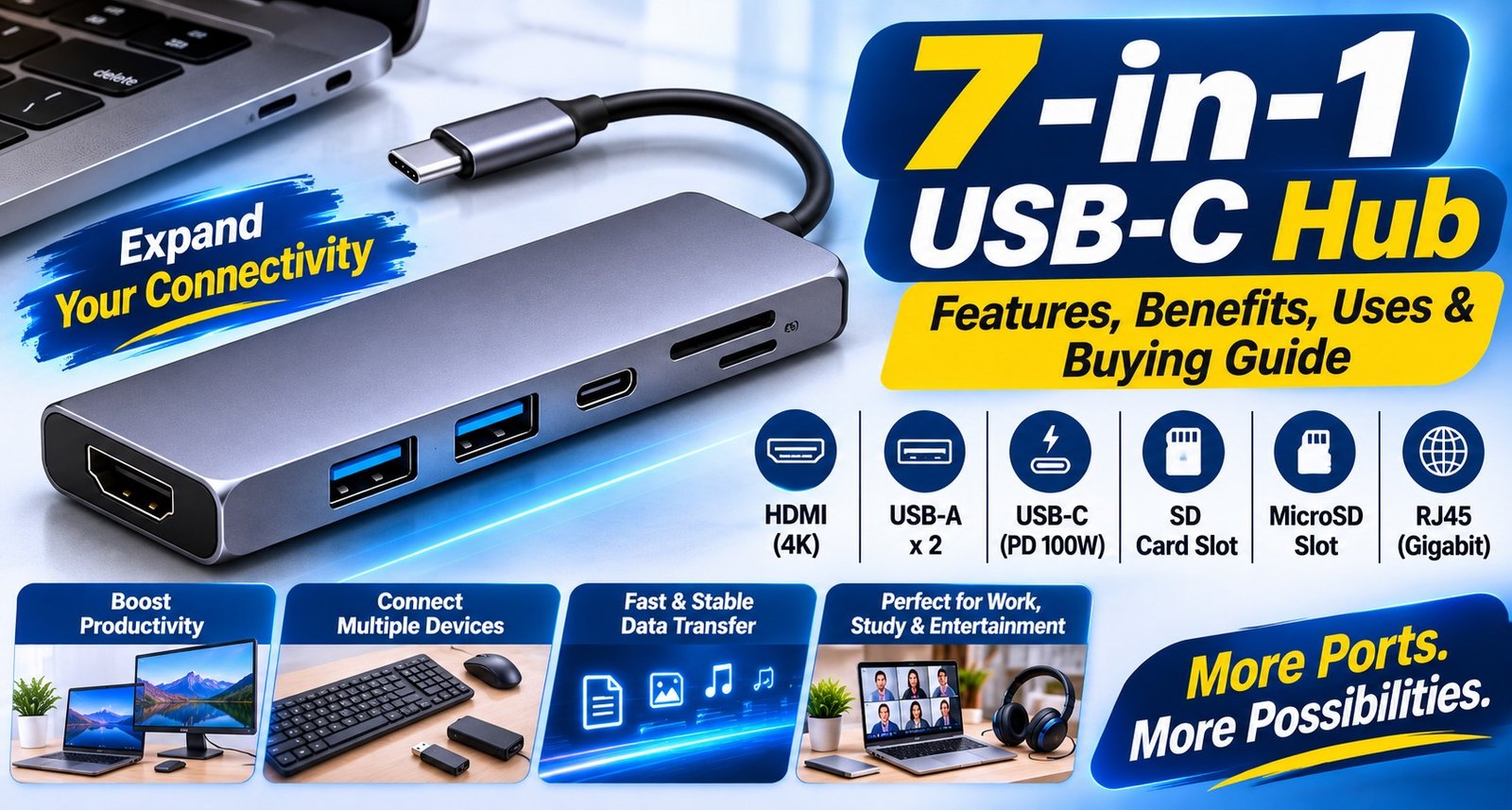
A 7 in 1 USB C Hub is a multiport connectivity accessory that expands one USB Type-C connection into multiple ports. It is designed for users who need additional connectivity options for their laptops, desktops, tablets and compatible smartphones.
Depending on the product configuration, it can include USB 3.0 and USB 2.0 ports for connecting different peripherals. This makes it useful for students, office professionals, content creators and people who regularly work with multiple devices.
Key Features of a 7-in-1 USB Hub
1. Multiple USB Connectivity Options
The main advantage of a USB C Hub Adapter is that it provides additional USB ports through a single Type-C connection. Users can connect compatible accessories such as keyboards, mice, printers, flash drives and other USB peripherals.
2. USB 3.0 Data Transfer
A USB 3.0 Type C Hub offers a USB 3.0 connection for compatible devices. USB 3.0 supports data transfer speeds of up to 5Gbps under suitable conditions. Actual transfer speeds depend on the connected device, cable, storage drive and file type.
3. USB 2.0 Connectivity
USB 2.0 ports are useful for connecting everyday accessories such as keyboards, mice, printers and other compatible peripherals. They provide convenient connectivity for devices that do not require high-speed data transfer.
4. Convenient Multiport Design
A Multi USB Connector Adapter helps reduce the need for multiple separate adapters. Instead of using individual connectors for different accessories, users can connect several devices through one hub.
5. Compact and Portable
A USB C Multiport Adapter is useful for people who travel frequently or work from different locations. Its compact design makes it convenient to carry inside a laptop bag, backpack or office accessories pouch.
Benefits of Using a 7-in-1 USB-C Hub
A multiport USB hub offers several advantages for everyday computer use.
Expanded Connectivity: Connect multiple compatible USB accessories through one Type-C port.
Better Productivity: Use a keyboard, mouse and other peripherals together.
Convenient File Transfer: Transfer files between compatible storage devices and computers.
Reduced Cable Clutter: Manage multiple accessories through a single hub.
Portable Solution: Carry additional connectivity options wherever you work.
Versatile Usage: Useful for home, office, education and travel.
Devices Compatible with a USB-C Hub
A USB Hub for Laptop can be useful for connecting multiple accessories to compatible laptops. However, device compatibility depends on the USB Type-C port and its supported functions.
Commonly used devices include:
Windows laptops
Compatible MacBooks
Desktop computers with supported USB-C ports
Compatible tablets
Smartphones supporting USB OTG or the required USB host functionality
Printers and scanners
External hard drives and flash drives
Keyboards and mice
Digital cameras and other USB accessories
USB-C Hub for MacBook
A USB C Hub for MacBook can help users connect additional USB accessories when their laptop has limited ports. It is useful for connecting external storage, a keyboard, a mouse and other compatible peripherals.
Before purchasing, check the MacBook model and its USB-C port specifications to confirm compatibility.
USB 2.0 vs USB 3.0: What Is the Difference?
Both USB 2.0 and USB 3.0 are commonly used for connecting computer accessories, but they offer different data transfer capabilities.
FeatureUSB 2.0USB 3.0Maximum theoretical speed480Mbps5GbpsBest suited forKeyboard and mouseFlash drives and external storageData transferStandardFasterCompatibilityWidely supportedRequires compatible devices
A USB 2.0 USB 3.0 Hub combines different port types to support both everyday accessories and compatible high-speed storage devices.
Common Uses of a USB-C Hub
1. Office Work
Connect a keyboard, mouse, printer and flash drive to improve your everyday office workflow.
2. Students and Online Learning
Students can use a hub to connect external storage devices, keyboards and other compatible accessories for studying and completing assignments.
3. File Transfer
Transfer documents, photographs, videos and other files between compatible computers and USB storage devices.
4. Photography and Content Creation
Photographers and content creators can use compatible USB ports to connect cameras, storage devices and other peripherals.
5. Home and Personal Use
A multiport hub is useful for connecting everyday computer accessories without frequently changing cables.
How to Choose the Right USB-C Hub
Before buying a USB hub, consider the following factors:
Number of Ports: Choose a hub with enough ports for your daily accessories.
USB Version: Check whether you need USB 2.0, USB 3.0 or both.
Device Compatibility: Confirm that your laptop or smartphone supports the required USB-C functions.
Data Transfer Speed: Check the supported speed of each port.
Build Quality: Look for a durable design suitable for regular use.
Power Requirements: Check whether your connected devices require additional power.
Brand and Warranty: Purchase from a reliable brand and review the warranty details.
A Type C USB Expander is a useful accessory for people who need more connectivity options from a compatible USB-C port.
Why Choose FEDUS USB-C Hub?
FEDUS offers practical connectivity accessories designed for everyday electronic and computing requirements. A 7-in-1 USB hub can help simplify your workspace by providing additional USB connectivity through a single Type-C connection.
Whether you use a laptop, desktop computer or compatible mobile device, it can help connect multiple peripherals for daily tasks. Before purchasing, check the product specifications and your device’s USB-C capabilities to ensure compatibility.
Conclusion
A 7-in-1 USB-C hub is a convenient accessory for users who need additional USB connectivity. It helps connect multiple compatible devices, supports everyday peripherals and makes file transfer more convenient. With USB 2.0 and USB 3.0 connectivity, it can serve different requirements at home, in the office or while travelling.
A USB Hub for PC and Mobile can be a useful addition to your accessories when your device supports the required USB-C functionality. Always check port specifications, compatibility and power requirements before purchasing.
Frequently Asked Questions (FAQs)
1. What is a 7-in-1 USB-C hub?
It is a connectivity accessory that expands one USB Type-C connection into multiple ports for connecting compatible USB devices.
2. Can I connect a keyboard and mouse at the same time?
Yes, you can connect both if the hub has available compatible USB ports.
3. Does a USB-C hub support data transfer?
Yes, compatible hubs support data transfer through their USB ports. Speed depends on the USB version and connected devices.
4. Can I use a USB hub with a MacBook?
Yes, provided your MacBook has a compatible USB-C port that supports the required functionality.
5. Can I connect a printer through a USB hub?
Yes, a compatible USB printer can generally be connected through an available USB port.
6. What is the difference between USB 2.0 and USB 3.0?
USB 3.0 offers a higher theoretical data transfer speed of up to 5Gbps, while USB 2.0 supports up to 480Mbps.
7. Can I connect an external hard drive?
Yes, if the drive and hub are compatible and the hub provides sufficient power.
8. Does a USB-C hub work with smartphones?
It can work with smartphones that support USB OTG or the required USB host functionality.
9. Can I connect multiple flash drives?
Yes, provided sufficient compatible ports are available and the connected devices do not exceed the hub’s power limits.
10. Is a USB-C hub useful for office work?
Yes, it can help connect keyboards, mice, printers, flash drives and other compatible accessories.
11. Does every USB-C port support a hub?
No. USB-C describes the connector type, but device ports may support different functions. Check your device specifications.
12. Can a USB hub improve internet speed?
No. A standard USB hub does not improve internet speed. It primarily expands USB connectivity.
13. Is a USB-C hub portable?
Most compact USB hubs are designed for easy carrying and everyday use.
14. Can I use USB 2.0 and USB 3.0 devices together?
Yes, compatible hubs can support both types of USB devices simultaneously.
15. What should I check before purchasing a USB-C hub?
Check the number of ports, USB versions, device compatibility, data transfer speeds, power requirements and product warranty.
Promote your articles nowCheck for details
Choose a promotion package
Choose a package below, scan the QR code and pay the displayed amount for 20 days.
After payment, email your article title and payment screenshot to info@yourneeds.asia. Once confirmation is received, one of our administrators will activate the promotion.
Choose where your promoted article receives extra visibility
Promotion changes presentation and placement for the selected period. It does not guarantee traffic, enquiries, search ranking or sales.
Priority visibility in the VIP Lounge, promoted shelves and highlighted article areas.
Top-style highlighting in article directories, homepage feeds and promoted article blocks.
Premium styling across supported article feeds, recommendations and directory placements.
Featured presentation in supported homepage, category, directory and related-article areas.
Build a stronger online presence for your business
Get Your Website for ₹15,000
Are you listed and don't have a website for your business? We can plan, design and launch a responsive website that makes your business easier to understand and contact.
Get My WebsiteSEO Starts from ₹10,000/Month
Improve how your business is presented across Google, local listings and AI-powered search results with ongoing SEO, content and authority-building work.
Improve My VisibilitySuggested Articles
View all articles
80W SuperVOOC Charger: Features, Benefits, Compatibility & Buying Guide
Introduction Fast charging has become an important feature for modern smartphones. Whether you use your phone for work, gaming, entertainment or daily communication, a…
30W iPhone Charger: Features, Benefits, Compatibility & Buying Guide
Introduction Fast charging has become an important requirement for smartphone and tablet users. Whether you use an iPhone, iPad, Samsung smartphone or a compatible…
USB 3.1 Type-C to Micro-B Hard Drive Cable: Features, Uses & Benefits
Introduction External hard drives are widely used to store photos, videos, documents, backups and other important files. To connect an external hard drive to…
USB Type-C Charging Cable: Features, Benefits, Uses & How to Choose the Right One
Introduction A reliable charging cable is an essential accessory for smartphones and other electronic devices. Whether you use your phone for work, entertainment, gaming…
Latest Blog Posts
View all articles
How to Plan Your Farmhouse Purchase in Naugaon?
Purchasing a farmhouse requires more than selecting an attractive location or finding a suitable plot. Buyers should evaluate land ownership, infrastructure, accessibility, maintenance and…

How to Find and Reach Facility Managers in 2026: A B2B Prospecting Guide
Finding facility managers is not always as simple as searching for companies and collecting contact details. Facility management involves several responsibilities, including building maintenance,…

Mayura TO One-Pass Trenching Machine for OFC and Utility Projects
The Mayura TO Trenching Machine from Autocracy Machinery is engineered for efficient underground utility and fibre-optic cable deployment. Designed for tractors above 60 HP,…

Press Release in UAE: Professional Press Release Distribution Services by MENAWireNOW
The United Arab Emirates (UAE) is one of the most dynamic business and media markets in the Middle East. With a growing economy, international…

Why Is Raaya Residences Becoming an Interesting Residential Address in North Goa?
Goa has gradually evolved beyond its traditional reputation as a holiday destination. Many property buyers now consider it for second homes, extended stays and…

Hidden Places in Goa That Most Tourists Don’t Know About
Ask a Goa taxi driver where to go and the answer is almost always Calangute, Baga, or Anjuna. Fair enough. Those beaches earned their…