
Networking Tools: Types, Uses, Benefits & How to Choose the Right Networking Tools

Published: |Last updated:
Listen to this article
Show Quick ReadConcise summary from this article
Introduction A reliable computer network is essential for homes, offices, schools, data centers, and businesses. Whether you are setting up an internet connection, installing LAN cables, connecting multiple computers, or troubleshooting network problems, having the right tools makes the work easier and more efficient. Networking Tools are essential for installing, testing, maintaining, and repairing wired network connections. These tools help technicians create secure cable connections, identify connectivity issues, measure network…
Ask AI About This Article
Answers are limited to information in this article.
Introduction
A reliable computer network is essential for homes, offices, schools, data centers, and businesses. Whether you are setting up an internet connection, installing LAN cables, connecting multiple computers, or troubleshooting network problems, having the right tools makes the work easier and more efficient.
Networking Tools are essential for installing, testing, maintaining, and repairing wired network connections. These tools help technicians create secure cable connections, identify connectivity issues, measure network performance, and maintain smooth communication between devices.
From simple cable cutters to advanced testing devices, different tools serve different purposes. Understanding their types, applications, and features can help you select the right equipment for your networking requirements.
What Are Networking Tools?
Networking tools are devices and accessories used to install, configure, test, troubleshoot, and maintain computer networks. They are commonly used by network technicians, IT professionals, electricians, CCTV installers, and system administrators.
These tools help establish connections between computers, routers, switches, servers, printers, IP cameras, and other network-enabled devices.
For example, when installing an Ethernet connection, a technician may need a cable stripper, crimping tool, connector, and cable tester. Each tool performs a specific function to ensure that the network connection is properly installed and working.
Types of Networking Tools
Different networking tasks require different tools. Here are some commonly used options.
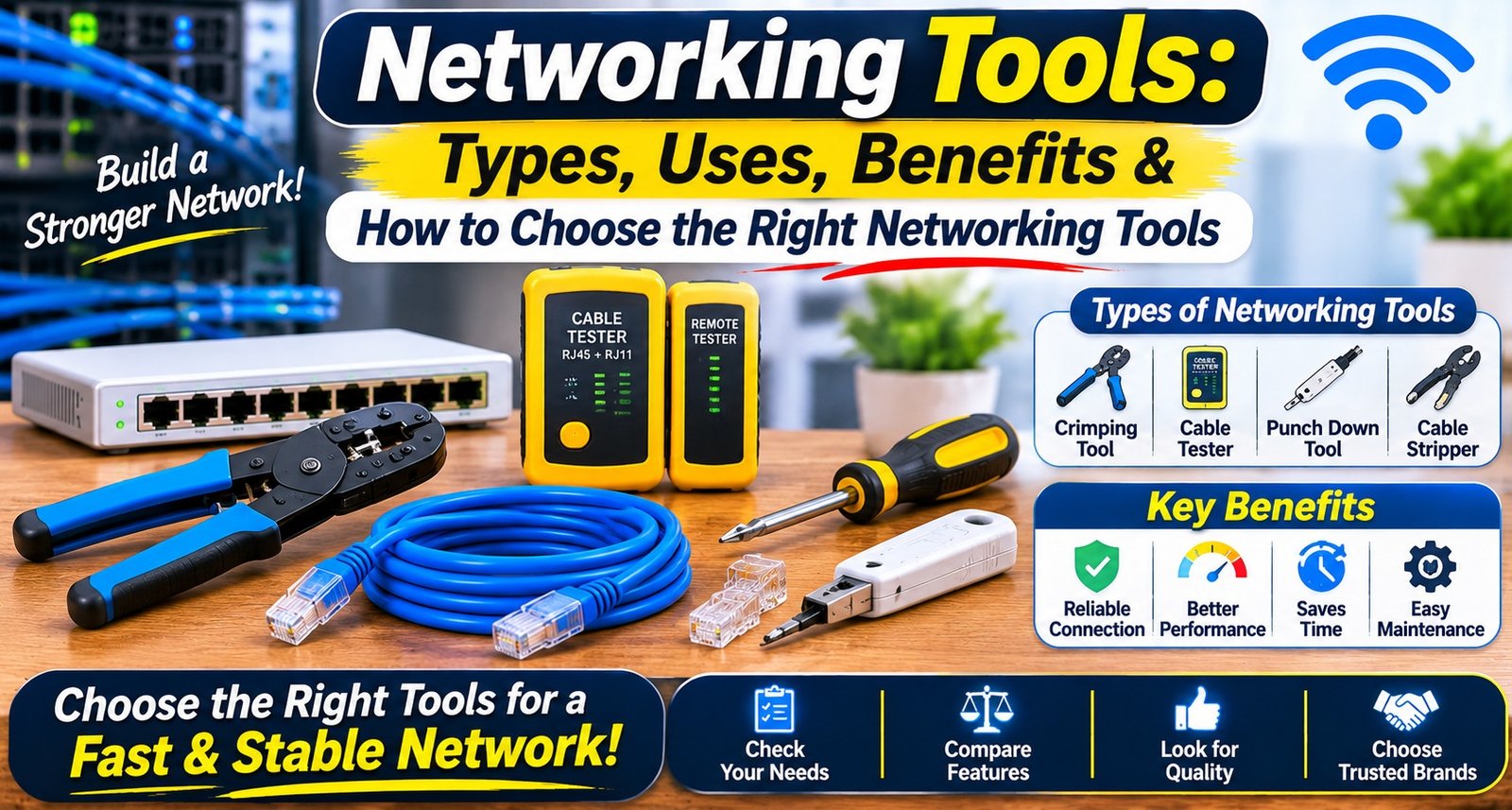
1. RJ45 Crimping Tool
An RJ45 Crimping Tool is used to attach RJ45 connectors to Ethernet cables. It presses the connector pins into the cable wires to create a proper physical connection.
It is commonly used when preparing LAN cables for computers, routers, switches, and CCTV systems.
Key uses:
Attaching RJ45 connectors to network cables.
Preparing custom-length Ethernet cables.
Creating patch cables for networking installations.
Supporting cable termination during network setup.
2. LAN Cable Tester
A LAN Cable Tester checks whether an Ethernet cable is correctly connected and wired. It helps identify common problems such as open circuits, short circuits, reversed wires, and incorrect pin connections.
Some testers also support remote testing, allowing technicians to check cables installed across rooms or buildings.
Key uses:
Checking Ethernet cable continuity.
Identifying incorrect wiring sequences.
Finding broken or disconnected wires.
Testing newly installed LAN connections.
3. Wire Stripper and Cable Cutter
Wire strippers and cable cutters are useful for preparing cables before installation. A stripper removes the outer insulation without unnecessarily damaging the internal wires, while a cutter helps trim cables to the required length.
Key uses:
Removing cable jackets.
Cutting cables cleanly.
Preparing wires for connector installation.
Supporting neat cable management.
4. Punch Down Tool
A punch down tool is used to insert and secure individual wires into insulation displacement connectors (IDC). It is commonly used with keystone jacks, patch panels, and network wall outlets.
Key uses:
Terminating wires in patch panels.
Connecting cables to keystone jacks.
Organising structured cabling installations.
Securing individual wires in IDC terminals.
5. Network Cable Tracer
A network cable tracer helps identify a particular cable within a group of cables. It generally consists of a signal generator and a probe that detects the signal.
This tool is especially useful in offices, server rooms, and large buildings where multiple cables run through the same area.
Key uses:
Locating specific cables.
Identifying cable routes.
Finding cables in crowded installations.
Simplifying network troubleshooting.
6. Network Cable Tester with Advanced Features
Advanced cable testers can provide more information than basic continuity testers. Depending on the model, they may check cable length, wiring faults, cable mapping, or other network characteristics.
They are useful for technicians who regularly install and troubleshoot larger network systems.
What Are the Main Uses of Networking Tools?
These tools support several important networking activities.
1. Network Installation
During a new network installation, technicians use different tools to prepare cables, attach connectors, terminate wires, and test connections. Proper installation helps reduce connectivity problems.
2. Cable Testing
Testing equipment helps verify whether network cables are correctly connected. It can identify wiring faults before the cables are used in an actual network.
3. Troubleshooting Network Problems
When a computer or IP camera fails to connect, technicians can use testing and tracing tools to investigate cable-related issues. This makes it easier to locate the source of a problem.
4. CCTV Installation
Ethernet cables are commonly used in IP camera installations. Proper cable preparation and testing tools help technicians establish reliable connections between cameras, network switches, and recording systems.
5. Office and Business Networking
Offices often require connections for computers, printers, routers, switches, and servers. Professional tools help technicians install and maintain these connections efficiently.
Benefits of Using the Right Networking Tools
Choosing suitable equipment offers several advantages.
1. Better Installation Quality: Proper tools help create secure and organised cable connections.
2. Time-Saving: Specialised equipment makes cable preparation, termination, and testing faster.
3. Easy Fault Detection: Testing devices help identify wiring problems and connectivity issues.
4. Improved Cable Management: Cutting, stripping, and termination tools support cleaner installations.
5. Reduced Installation Errors: Using the correct equipment can minimise mistakes during cable preparation and connection.
6. Convenient Maintenance: Technicians can inspect existing connections and troubleshoot faults more efficiently.
What Are Network Cable Tools?
Network Cable Tools are specialised devices used to prepare, install, terminate, and test network cables. They are important for creating reliable wired connections in residential, commercial, and industrial environments.
Common examples include:
Cable crimpers
Wire strippers
Cable cutters
Punch down tools
Cable testers
Cable tracers
These tools are useful for both new installations and the maintenance of existing network infrastructure.
How to Choose the Right Networking Tools?
Selecting the right tools depends on your installation requirements, network type, experience, and budget. Consider the following factors before purchasing.
1. Identify Your Networking Requirements
First, understand the type of work you need to perform. Basic home networking may require only a few cable preparation and testing tools, whereas professional installations may need a complete toolkit.
2. Check Cable Compatibility
Make sure the tools support the cable types you work with, such as Cat5e, Cat6, Cat6A, or other supported Ethernet cables. Also check connector compatibility before purchasing crimping equipment.
3. Look for Durable Construction
Choose tools made from durable materials with comfortable handles and reliable working mechanisms. Strong construction is particularly important for technicians who use their equipment regularly.
4. Consider Testing Features
For cable testing, select a device according to the faults and cable parameters you need to check. A basic continuity tester may be enough for simple installations, while advanced work may require additional testing functions.
5. Choose Easy-to-Use Designs
Ergonomic handles, clear indicators, and simple operating controls make tools easier to use, especially during long installation tasks.
6. Compare Quality and Price
Avoid selecting tools based only on the lowest price. Compare their build quality, supported cable types, features, and intended applications to find suitable equipment.
Difference Between Networking Tools and Networking Equipment
Although both are important for setting up a network, tools and equipment serve different purposes.
Networking tools are primarily used to install, test, repair, and maintain network connections. Examples include crimping tools, cable testers, strippers, and punch down tools.
Networking Equipment refers to the devices that create and manage the network itself. Examples include routers, switches, modems, access points, and network adapters.
In simple terms, tools help technicians build and maintain network connections, while equipment helps devices communicate over the network.
Network Maintenance Tools: Why Are They Important?
Network Maintenance Tools help technicians inspect, test, and troubleshoot existing network connections. Regular maintenance is important for identifying cable damage, loose connections, and wiring problems.
Some useful maintenance practices include:
Checking cables for visible damage.
Testing connections after installation or repair.
Replacing damaged connectors.
Organising cables to prevent tangling.
Checking network ports and physical connections.
Keeping testing tools clean and properly stored.
Regular inspections can help maintain a more organised network infrastructure and make future troubleshooting easier.
Common Mistakes to Avoid When Using Networking Tools
Even good-quality tools may not deliver the desired results if they are used incorrectly. Avoid these common mistakes:
Using incompatible connectors with Ethernet cables.
Incorrectly arranging wire pairs before crimping.
Applying excessive force while stripping cable insulation.
Skipping cable testing after installation.
Using damaged or poorly maintained tools.
Ignoring the cable category and supported specifications.
Leaving cables loosely arranged or improperly labelled.
Following the correct installation process helps create organised and dependable network connections.
Conclusion
Choosing the right tools is an important part of building and maintaining a reliable wired network. From crimping and cable stripping to testing and troubleshooting, every tool has a specific role in network installation and maintenance.
Whether you are setting up a home LAN connection, installing an office network, or working on a CCTV project, selecting suitable tools can make the process easier and more organised.
Before purchasing, consider cable compatibility, build quality, testing requirements, ease of use, and your actual installation needs. The right combination of tools will help you complete networking tasks with greater accuracy and convenience.
Frequently Asked Questions (FAQs)
1. What are networking tools used for?
They are used to install, test, repair, and maintain wired network connections.
2. Which tools are required for Ethernet cable installation?
Common tools include a crimping tool, cable stripper, cutter, RJ45 connectors, and a cable tester.
3. What is an RJ45 crimping tool?
It is a tool used to attach RJ45 connectors to Ethernet cables by securing the connector pins to the internal wires.
4. Why is a LAN cable tester important?
It checks cable continuity and helps identify wiring faults such as open circuits, short circuits, and incorrect connections.
5. Can networking tools be used for CCTV installation?
Yes. They are commonly used to prepare and test Ethernet cables for IP camera and other wired CCTV installations.
6. What is a punch down tool used for?
It inserts individual wires into IDC terminals found in patch panels, keystone jacks, and network outlets.
7. Are all Ethernet crimping tools compatible with every cable?
No. Compatibility depends on the supported cable category, conductor type, connector design, and tool specifications.
8. What is the difference between a cable tester and a cable tracer?
A cable tester checks cable wiring and continuity, while a cable tracer helps locate and identify a particular cable.
9. Which networking tools are suitable for beginners?
A basic crimping tool, wire stripper, cable cutter, and simple cable tester are useful starting options for basic Ethernet cable work.
10. How often should networking tools be maintained?
Inspect them regularly, clean them after use, and check for worn or damaged parts before starting a new installation.
11. Can a cable tester detect every network problem?
No. Basic testers mainly identify wiring and continuity faults. They may not detect every performance, configuration, or active network issue.
12. What should I check before buying a cable tester?
Check supported cable categories, wiring standards, testing functions, remote-unit support, and ease of operation.
13. Are networking tools useful for home networks?
Yes. They can help prepare Ethernet cables, check wired connections, and troubleshoot basic LAN problems.
14. What is the difference between Cat6 and Cat6A cable tools?
Some tools support both categories, but compatibility depends on their specifications and the connectors being used. Always check the manufacturer’s supported cable types.
15. Where are networking tools commonly used?
They are used in homes, offices, schools, server rooms, data centers, commercial buildings, and CCTV installations.
Promote your articles nowCheck for details
Choose a promotion package
Choose a package below, scan the QR code and pay the displayed amount for 20 days.
After payment, email your article title and payment screenshot to info@yourneeds.asia. Once confirmation is received, one of our administrators will activate the promotion.

Choose where your promoted article receives extra visibility
Promotion changes presentation and placement for the selected period. It does not guarantee traffic, enquiries, search ranking or sales.
Priority visibility in the VIP Lounge, promoted shelves and highlighted article areas.
Top-style highlighting in article directories, homepage feeds and promoted article blocks.
Premium styling across supported article feeds, recommendations and directory placements.
Featured presentation in supported homepage, category, directory and related-article areas.
Build a stronger online presence for your business
Get Your Website for ₹15,000
Are you listed and don't have a website for your business? We can plan, design and launch a responsive website that makes your business easier to understand and contact.
Get My WebsiteSEO Starts from ₹10,000/Month
Improve how your business is presented across Google, local listings and AI-powered search results with ongoing SEO, content and authority-building work.
Improve My VisibilitySuggested Articles
View all articles
Guitar Jack Cable: Types, Uses, Benefits & How to Choose the Right Instrument Cable
Music is all about clear sound, smooth performance and reliable equipment. Whether you are playing an electric guitar, bass guitar, keyboard or another musical…
Type C to VGA Adapter: Uses, Benefits & How to Connect Your Devices to a Monitor or Projector
Introduction Connecting a modern laptop, tablet or smartphone to an older monitor or projector can sometimes be challenging because different devices use different display…

Video Couplers & Jointers: Types, Uses, Benefits & How to Choose the Right Connector
Introduction Video connections are an important part of modern CCTV surveillance systems, security cameras, televisions and other video equipment. A stable connection helps transmit…
Video Adapters: Types, Uses, Benefits & How to Choose the Right Adapter
Introduction Connecting laptops, desktops, smartphones and other devices to monitors, televisions or projectors is easier with the right display accessories. However, different devices often…
Latest Blog Posts
View all articles
التجربة الماليزية في استثمار أموال الزكاة ودور بيت المال في الهندسة المالية الإسلامية
تُعد التجربة الماليزية في الهندسة المالية الإسلامية من التجارب المهمة في إدارة أموال الزكاة واستثمار الفائض منها، حيث اعتمدت المؤسسات الإسلامية في ماليزيا…

Substance Abuse and Personality Changes: When Someone Stops Acting Like Themselves
Substance abuse can change more than a person’s physical health. It can affect how they think, handle emotions, and connect with others. Someone…

Event Management Companies in Karachi: How to Choose the Right Event Partner
Karachi is a vibrant city where weddings, corporate gatherings, private celebrations, and social events are an important part of everyday life. Organizing a successful…
Modern Agricultural Solutions: Understanding Tractor Mounted Post Hole Digger Machines
Modern Agricultural Solutions: The Role of Tractor Mounted Post Hole Diggers Agricultural and infrastructure projects often require accurate and efficient ground drilling for fencing,…

Teeth Whitening: Professional vs. At-Home Options
A brighter smile is one of the quickest ways to feel more confident. It’s no surprise that teeth whitening is one of the most…

Computer Vision for Robotics: Build Smarter Robots with Kivo Eye
Computer Vision for Robotics: Build Smarter Robots with AI-Powered Vision Solutions by Kivo Eye The robotics industry is transforming rapidly as businesses adopt Artificial…