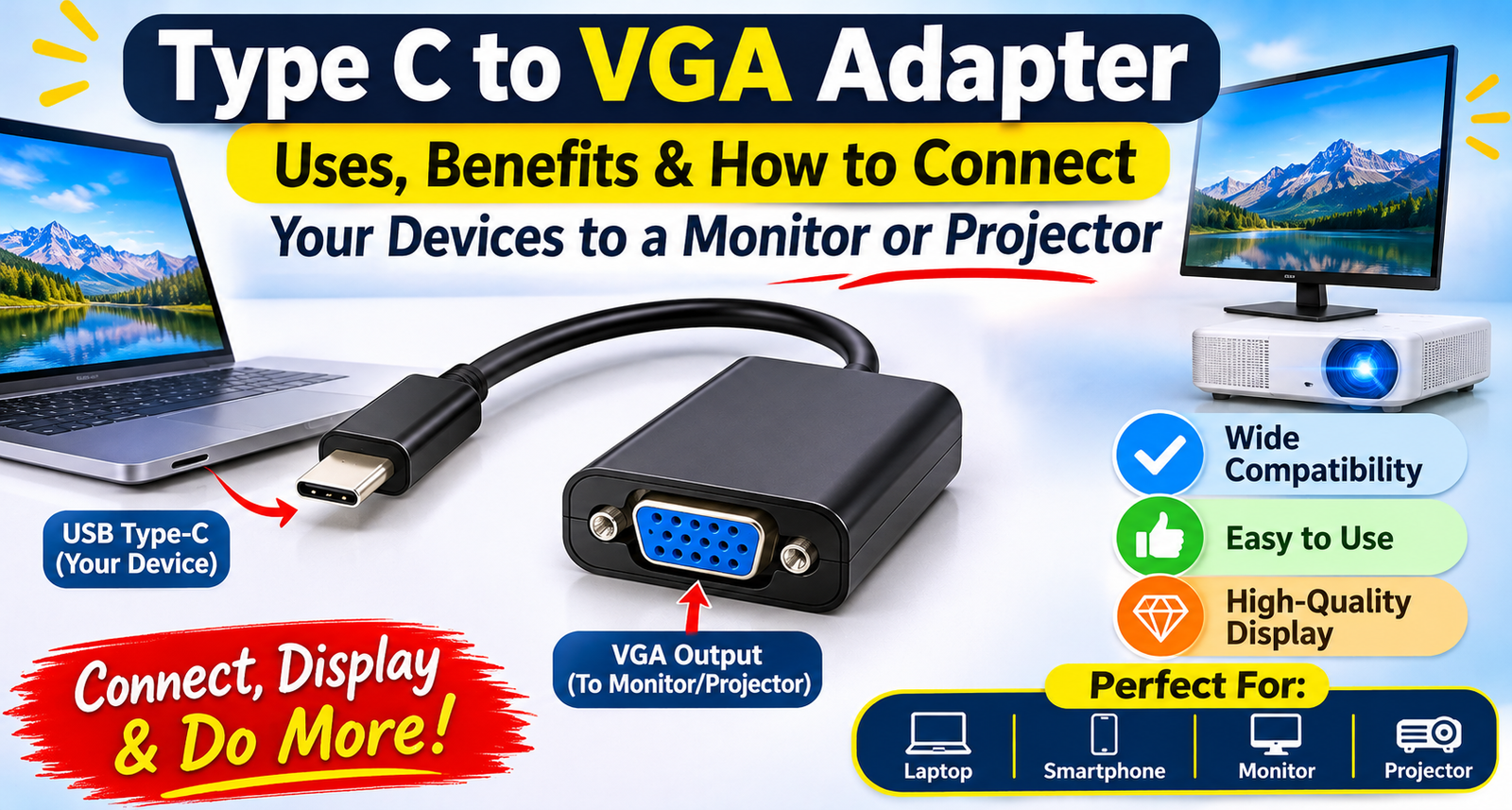
Type C to VGA Adapter: Uses, Benefits & How to Connect Your Devices to a Monitor or Projector

Published: |Last updated:
Listen to this article
Show Quick ReadConcise summary from this article
Introduction Connecting a modern laptop, tablet or smartphone to an older monitor or projector can sometimes be challenging because different devices use different display ports. Many modern devices feature USB Type-C ports, while several monitors, projectors and office display systems still use VGA connections. A suitable adapter helps bridge this connection gap and makes it easier to display content on a larger screen. A Type-C to VGA connection accessory is…
Ask AI About This Article
Answers are limited to information in this article.
Introduction
Connecting a modern laptop, tablet or smartphone to an older monitor or projector can sometimes be challenging because different devices use different display ports. Many modern devices feature USB Type-C ports, while several monitors, projectors and office display systems still use VGA connections. A suitable adapter helps bridge this connection gap and makes it easier to display content on a larger screen.
A Type-C to VGA connection accessory is useful for presentations, classrooms, offices and home setups. It allows compatible devices to send video output to an external display through a VGA connection. In this guide, we will explore how these adapters work, their uses, benefits and the important factors to consider before choosing one.
What Is a Type C to VGA Adapter?
A Type C to VGA Adapter is a connectivity accessory that connects a compatible USB Type-C device to a VGA monitor, projector or display. It is especially useful when your laptop or tablet has a USB-C port but your external screen uses a VGA input.
The adapter converts a compatible digital video output into a format supported by VGA displays. However, the source device must support video output through its USB-C port, such as DisplayPort Alt Mode or another compatible video-output technology. A standard USB-C charging or data-only port may not support external display output.
How Does It Work?
A USB-C display adapter connects to the Type-C port of a source device and provides a VGA output for an external display. Once connected, the device can send supported video signals to the monitor or projector.
A USB C to VGA Adapter is commonly used for presentations, watching supported video content, extending a desktop or mirroring a laptop screen. The VGA cable connects the adapter to the display, while the source device handles the video output.
For successful operation, check the compatibility of the device, adapter, VGA cable and display.
Common Types of Type-C to VGA Adapters
Different designs are available depending on the user’s connectivity requirements.
1. Type-C to VGA Cable
A Type C to VGA Cable provides a direct connection between a compatible USB-C device and a VGA display. It can be useful when you want a simple cable-style solution without using a separate VGA cable.
2. USB-C to VGA Female Converter
A USB C to VGA Converter provides a USB-C input and VGA output, allowing users to connect an existing VGA cable to a modern device. This is particularly useful in offices and classrooms where VGA cables are already installed.
3. Female VGA Adapter
A USB C to VGA Female Adapter generally features a VGA female port, allowing a VGA male cable to connect to it. This design is convenient when connecting laptops and tablets to projectors or monitors using an existing VGA cable.
Uses of Type-C to VGA Adapters
These adapters are useful in different environments where USB-C devices need to connect with VGA displays.
Office Presentations
Professionals can connect compatible laptops to VGA projectors in meeting rooms and conference halls. This makes it easier to display presentations, spreadsheets, documents and other visual content.
Educational Institutions
Teachers and students can connect supported laptops or tablets to classroom projectors. It helps display lessons, presentations and educational material on larger screens.
Home and Office Monitors
Users can connect compatible computers to VGA monitors for work, browsing and other display requirements. It can also help reuse an older monitor with a newer device.
Business and Conference Rooms
Many conference rooms still have VGA-based display equipment. An adapter helps users connect modern devices to existing presentation systems without replacing the entire display setup.
Key Benefits
1. Connect Modern and Older Devices
The main advantage is compatibility between supported USB-C devices and VGA displays. It helps make older monitors and projectors useful with newer hardware.
2. Full HD Display Support
A 1080P VGA Adapter can support Full HD output up to 1920 × 1080 at a compatible refresh rate, depending on the adapter and connected equipment. Always check the product specifications before purchasing.
3. Convenient External Display Setup
A USB C Display Adapter provides a practical way to connect a compatible device to an external screen. It can support screen mirroring or extended display modes, depending on the operating system and hardware.
4. Portable and Easy to Use
Compact adapter designs are convenient to carry in a laptop bag. They are useful for people who frequently travel between offices, classrooms and meeting rooms.
5. Reuse Existing VGA Equipment
You may not need to replace an older VGA monitor or projector just because your new laptop has a USB-C port. A compatible adapter can help extend the useful life of existing display equipment.
How to Choose the Right Adapter
Before purchasing, consider these important factors:
- Device Compatibility: Confirm that your laptop, tablet or smartphone supports video output through USB-C.
- Resolution Support: Check whether the adapter supports your required resolution, such as Full HD 1080p.
- Connector Type: Make sure the VGA port configuration matches your existing cable.
- Build Quality: Look for a durable design suitable for regular use.
- Cable Length: Choose a suitable length for your desk, meeting room or presentation setup.
- Operating System: Check compatibility with your device’s operating system and display settings.
A Type C to VGA Converter Cable is a practical choice when you need to connect a compatible USB-C device to an existing VGA display. Always review the supported specifications to avoid compatibility issues.
How to Connect a Type-C Device to a Projector
Follow these simple steps:
- Check whether your laptop, tablet or phone supports USB-C video output.
- Connect the adapter to the device’s USB-C port.
- Attach a compatible VGA cable to the adapter.
- Connect the other end of the VGA cable to the projector or monitor.
- Turn on the external display and select the correct VGA input.
- Open your device’s display settings and choose screen mirroring or extended display mode.
A USB C to Projector Adapter can make presentations easier when the projector has a VGA input and the source device supports compatible video output.
MacBook and Other Device Compatibility
A MacBook to VGA Adapter can be useful for connecting compatible MacBook models to VGA monitors and projectors. Similar setups may also work with supported iPads, smartphones and Windows laptops featuring USB-C video output.
However, not every USB-C device supports video transmission. For example, compatibility with iPhone 16 or 17, Samsung Galaxy S24 or S25 and iPad Pro depends on the specific model and its supported display-output features. Check the device specifications before buying.
Common Mistakes to Avoid
- Assuming every USB-C port supports video output.
- Ignoring the maximum supported resolution and refresh rate.
- Choosing an adapter with the wrong VGA connector configuration.
- Forgetting to select the correct input source on the monitor or projector.
- Expecting VGA to carry audio, as VGA transmits video only.
- Assuming an adapter can convert every device’s signal without checking compatibility.
Conclusion
A Type-C to VGA adapter is a useful accessory for connecting compatible modern devices to VGA-based monitors and projectors. It can help with office presentations, classroom lessons, business meetings and everyday display requirements. Before choosing one, check USB-C video-output support, resolution compatibility, connector configuration and build quality. The right adapter can make connecting different generations of display equipment simpler and more convenient.
Frequently Asked Questions (FAQs)
1. What is a Type-C to VGA adapter used for?
It connects a compatible USB-C device to a VGA monitor or projector.
2. Does every USB-C port support VGA output?
No. The USB-C port must support video output through a compatible technology.
3. Can I connect my laptop to an old VGA monitor?
Yes, if the laptop supports USB-C video output and you use a compatible adapter.
4. Does VGA support audio?
No. VGA carries video signals only. A separate audio connection is required.
5. Can I use this adapter with a projector?
Yes, if the projector has a VGA input and the source device supports video output.
6. Does it support Full HD resolution?
Some models support up to 1080p. Check the specifications of the particular adapter.
7. Can I use it with a MacBook?
It can work with compatible MacBook models that support USB-C video output.
8. Can I use it with a smartphone?
Only if the smartphone supports compatible video output through its USB-C port.
9. Can I extend or mirror my screen?
Many compatible devices support mirroring or extended display modes through their display settings.
10. Do I need a separate VGA cable?
A female VGA adapter generally requires a separate VGA cable to connect to the display.
Promote your articles nowCheck for details
Choose a promotion package
Choose a package below, scan the QR code and pay the displayed amount for 20 days.
After payment, email your article title and payment screenshot to info@yourneeds.asia. Once confirmation is received, one of our administrators will activate the promotion.
Choose where your promoted article receives extra visibility
Promotion changes presentation and placement for the selected period. It does not guarantee traffic, enquiries, search ranking or sales.
Priority visibility in the VIP Lounge, promoted shelves and highlighted article areas.
Top-style highlighting in article directories, homepage feeds and promoted article blocks.
Premium styling across supported article feeds, recommendations and directory placements.
Featured presentation in supported homepage, category, directory and related-article areas.
Build a stronger online presence for your business
Get Your Website for ₹15,000
Are you listed and don't have a website for your business? We can plan, design and launch a responsive website that makes your business easier to understand and contact.
Get My WebsiteSEO Starts from ₹10,000/Month
Improve how your business is presented across Google, local listings and AI-powered search results with ongoing SEO, content and authority-building work.
Improve My VisibilitySuggested Articles
View all articles
Video Couplers & Jointers: Types, Uses, Benefits & How to Choose the Right Connector
Introduction Video connections are an important part of modern CCTV surveillance systems, security cameras, televisions and other video equipment. A stable connection helps transmit…
Video Adapters: Types, Uses, Benefits & How to Choose the Right Adapter
Introduction Connecting laptops, desktops, smartphones and other devices to monitors, televisions or projectors is easier with the right display accessories. However, different devices often…
PoE Switch: Types, Working, Benefits, Uses & How to Choose the Right One
Introduction Modern networking systems require reliable connectivity for devices such as IP cameras, wireless access points, VoIP phones, and other network equipment. Installing separate…
Laptop Sleeve for 13.6, 14 & 15.6 Inch Laptop – Slim, Lightweight & Protective Carry Case
Introduction A laptop is an important part of everyday life, whether you use it for office work, online classes, business meetings, or personal tasks.…
Latest Blog Posts
View all articles
How Can First-Time Buyers Find Villa Plots for Sale in Goa?
Buying property in Goa can be an exciting decision, especially for people planning to build a customised home or purchase a holiday residence. However,…

Is Buying a Farmhouse in Naugaon, Alwar a Good Investment for Delhi NCR Buyers?
Buying a farmhouse outside Delhi NCR is no longer just about owning a large piece of land. For many buyers, it is about finding…

Website Development Company Dubai: Building Scalable Websites for Modern Businesses
A business website should do more than introduce a company online. It should help visitors understand its services, find relevant information and take meaningful…
Managed Apartments in Goa Managed Property Opportunities
Buying a property in Goa can offer access to a different lifestyle and residential environment. However, owners who live outside the state may find…

Keeping Teeth Clean With Braces: A Practical Guide
When you first attempt to brush with braces, it might seem as if you are cleaning your teeth while working at a miniature construction…

Press Release in UAE: How to Reach the Right Audience with MENAWireNOW
The United Arab Emirates (UAE) is one of the most dynamic business and media markets in the Middle East. With growing opportunities in technology,…